

What is business software integration?
Business software integration is the practice of connecting separate software applications so they share data and trigger workflows automatically, without manual handoffs between systems. When your CRM, ERP, finance platform, and support tools operate in isolation, your team pays the price in duplicate data entry, delayed reporting, and decisions made on stale information.
The core elements of any integration include:
- Data flow: Structured movement of records between systems in real time or on a defined schedule
- APIs and middleware: The technical connectors that translate and route data between applications
- Automated workflows: Rules that trigger actions across systems when a business event occurs
- Governance: Defined ownership, standards, and monitoring to keep integrations reliable over time
Software integration vs. system integration: These terms overlap but differ in scope. Software integration connects specific applications at the data and workflow layer. System integration is broader, encompassing hardware, networks, databases, and organizational processes. Most business teams deal primarily with software integration, though large modernization projects often require both.
The challenges are real from the start. Nearly two-thirds of organizations cite poor data quality as their primary barrier to successful integration, and only 2% of organizations have successfully integrated more than half of their enterprise applications. Those numbers set realistic expectations: integration is achievable, but it requires deliberate planning.

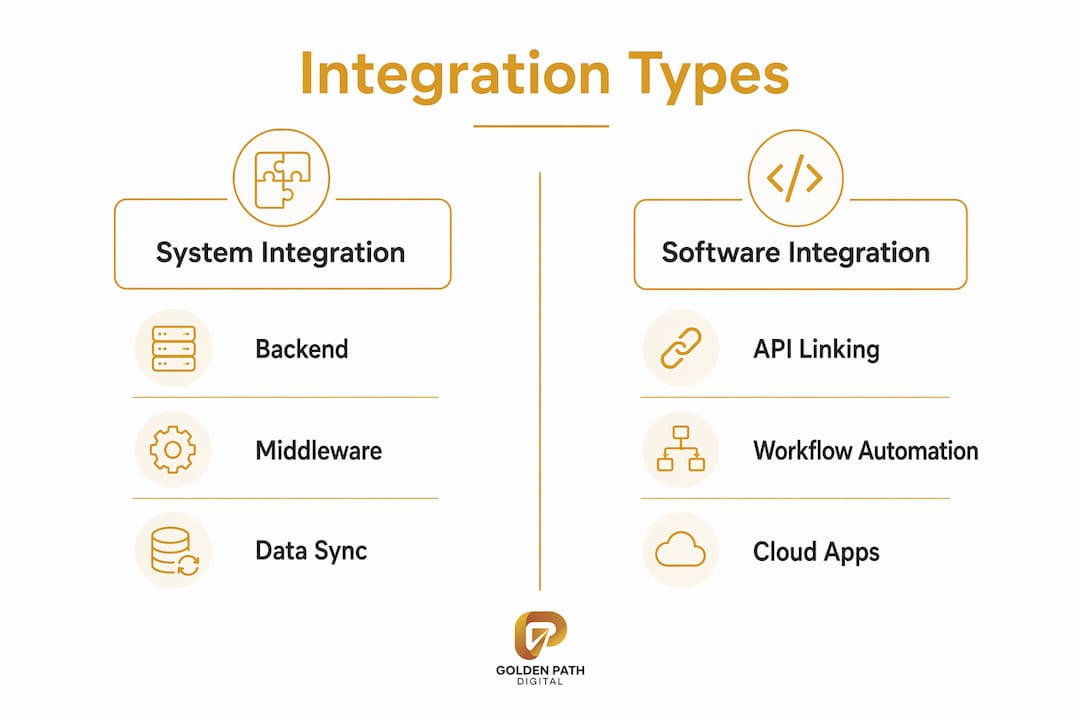
Main types of software integration you should know
Choosing the right integration approach depends on your system count, data volume, and how much change you anticipate. Each method carries distinct trade-offs.
- Point-to-point integration: Directly connects two applications with custom code. Fast to build for a single use case, but complexity grows exponentially as you add more systems, creating a web of brittle dependencies that is expensive to maintain.
- Middleware-based integration: An intermediary layer (such as an Enterprise Service Bus, or ESB) sits between applications, translating formats and routing messages. This reduces direct dependencies and works well in legacy or multi-vendor environments.
- API-led integration: Systems expose governed, reusable APIs that any authorized application can consume. This approach supports real-time data exchange and is the foundation of most modern software integrations.
- iPaaS (Integration Platform as a Service): Cloud-native platforms that provide pre-built connectors, workflow orchestration, and monitoring without the infrastructure overhead of an ESB. Enterprise iPaaS solutions add governance and error handling for high-volume, business-critical connections.
- Cloud and hybrid integration: Connects cloud-based SaaS tools with on-premises systems. Common during phased modernization, where legacy platforms are gradually decoupled and migrated.
- EDI (Electronic Data Interchange): The standard for structured B2B document exchange, used across retail, healthcare, and manufacturing. EDI handles high-volume, batch-oriented transactions; APIs handle real-time, flexible exchanges. Most mature enterprises run both in parallel.
- Event-driven integration: Systems publish and subscribe to business events as they occur, triggering downstream workflows without polling. This eliminates the latency of batch synchronization for time-sensitive processes like order fulfillment.
Key benefits of implementing software integration
The operational case for integration is straightforward: connected systems eliminate the manual work that slows your team and corrupts your data.
- Improved data accuracy: A single source of truth for customer, order, and financial records removes the inconsistencies that accumulate when teams copy data between systems by hand.
- Workflow automation: Integrated systems can execute multi-step processes automatically. When an order is placed, the ERP, warehouse, and logistics platform all update without a human in the loop.
- Reduced manual entry: Fewer keystrokes means fewer errors and less time spent on reconciliation.
- Faster reporting: Finance and operations teams get real-time visibility instead of waiting for end-of-day exports.
- Compliance support: Regulated industries benefit from automated audit trails and consistent data handling. AgentSync, for example, automates insurance compliance workflows and producer lifecycle processes entirely through API integration.
- Better customer experience: When support agents see a unified view of orders, invoices, and entitlements, resolution time drops.
- Scalability: A governed integration architecture lets you add new systems without rebuilding connections from scratch each time.
When should your business pursue software integration?
Certain trigger events make integration urgent rather than optional. Recognizing them early helps your team act before the cost of inaction compounds.
- Legacy modernization: Aging IBM i, COBOL, or on-premises ERP systems often cannot share data with modern SaaS tools without an integration layer. This is where legacy code modernization and integration planning intersect directly.
- Mergers and acquisitions: Combining two organizations means combining two application stacks. Integration determines how quickly the merged entity can operate as one.
- Digital transformation: Moving workflows to cloud platforms requires connecting new tools with existing systems of record.
- Cloud migration: Lifting applications to the cloud without integrating them with on-premises data sources creates new silos rather than eliminating old ones.
- Persistent data silos: When teams maintain separate spreadsheets because systems do not talk to each other, the integration gap is already costing you.
- Manual error rates: If your team spends meaningful time reconciling records between systems, that is a measurable integration failure with a calculable cost.
- Growth plans: Scaling operations on disconnected systems multiplies coordination overhead. Integration is far cheaper to architect before growth than after.
How to design an effective software integration strategy
Enterprise software integration strategy must align technical architecture with business goals, not the other way around. A tactical project connects two systems; a strategy defines how all systems exchange data, how integrations are governed, and how the organization adapts as needs change.
- Assess your current state. Map every major system: CRM, ERP, finance, support, HR, and any department-specific tools. Document what data each system owns, how systems currently connect, and where manual handoffs substitute for proper integration.
- Define data ownership. Establish which system is authoritative for each data domain before designing any workflow. The CRM owns the customer record; the ERP owns financials. These designations determine data flow direction and resolve conflicts when records differ.
- Set measurable business outcomes. Replace vague goals (“integrate CRM with ERP”) with specific targets (“eliminate manual order entry and reduce fulfillment errors by defining a single order record”). Outcome-focused goals keep scope controlled.
- Build a phased roadmap. Prioritize quick wins that demonstrate value while laying the architectural foundation for long-term connections. Connect central transactional systems first, then extend to analytics, reporting, and AI-ready data pipelines.
- Choose your architecture. Select API-led, event-driven, middleware-based, or hybrid approaches based on system count, real-time requirements, and legacy constraints. Favor middleware or integration hubs over point-to-point connections whenever more than a handful of systems are involved.
- Test with real production data. Production data contains duplicates, null fields, and format inconsistencies that synthetic test data never replicates. Testing against actual production snapshots catches failures before they reach live workflows.
- Establish governance and ownership. Define who owns each integration, what standards apply, and how changes are managed. Maintenance and adaptation costs post-launch frequently exceed initial implementation costs when governance is absent.
- Plan for ongoing operations. Integration is a long-term capability, not a one-time project. Build monitoring, alerting, and change management protocols from the start so your architecture stays stable as systems evolve.
Pro Tip: Establish an Integration Center of Excellence with representatives from IT, operations, finance, and key business units. This cross-functional team sets API standards, data ownership rules, and onboarding requirements, keeping integration decisions aligned with business priorities rather than individual team preferences.

Expert insights from US-based software integration firms
US-based firms working in this space reflect the full range of integration complexity, from compliance-heavy regulated industries to legacy ERP modernization.
- Golden Path Digital takes a dependency-mapping-first approach before applying automation or AI. Their tools, AS/Forward and Laravel Ascend, address the integration challenges that surface during IBM i RPG codebase modernization and Laravel framework upgrades, where understanding existing dependencies is the prerequisite for safe integration work.
- Software Integration Services Inc specializes in ERP and business systems integration across SAP, PeopleSoft, and Oracle environments, with a focus on complex industries. The firm has been recognized among the top 50 fastest-growing private companies in northeast Florida and on the Inc 5000 list.
- AgentSync demonstrates what API integration looks like in a regulated industry: producer lifecycle management, compliance workflows, and carrier contracting, all automated through a purpose-built API layer.
- InterSoft Associates, Inc. focuses on legacy system modernization, COBOL replacement, and custom software development, addressing the integration gaps that appear when aging platforms cannot support modern data exchange.
- Biz4Group LLC and Imenso Software both offer custom software development and integration services for mid-market US businesses, covering API development, cloud migration, and process automation.
- Instinctools and Systems Integration Inc round out the US market with project-based integration consulting and systems architecture services for enterprise clients.
| Company | Core Focus | Integration Specialty |
|---|---|---|
| Golden Path Digital | Legacy modernization, AI automation | IBM i RPG, Laravel, HIPAA-compliant workflows |
| Software Integration Services Inc | ERP integration | SAP, PeopleSoft, Oracle, process automation |
| AgentSync | Insurance compliance | Producer lifecycle, API-led compliance workflows |
| InterSoft Associates, Inc. | Legacy modernization | COBOL replacement, database migration |
| Biz4Group LLC | Custom software | API development, cloud integration |
| Imenso Software | Custom development | Process automation, system connectivity |
For teams evaluating custom integration solutions, the right partner depends heavily on your existing stack, your industry’s compliance requirements, and whether your primary challenge is legacy modernization or net-new connectivity.
Key Takeaways
Successful business software integration requires governance, realistic data expectations, and a phased architecture strategy, not just technical connections.
| Point | Details |
|---|---|
| Start with assessment | Map every system, data owner, and manual handoff before writing a single integration spec. |
| Many organizations struggle broadly | Integrating more than half their enterprise applications is rare, making phased planning critical. |
| Data quality is a common barrier | Many organizations cite poor data quality as their primary integration obstacle. |
| Governance prevents drift | Post-launch maintenance costs exceed initial build costs when ownership and standards are undefined. |
| Test on real data | Production snapshots, not synthetic data, reveal the duplicates and format gaps that break live workflows. |
FAQ
What is software integration?
Software integration is the process of connecting separate applications so they share data and trigger workflows automatically, eliminating manual handoffs and creating a unified operational environment.
What are some examples of integrated software?
Common examples include a CRM connected to an ERP so sales orders flow directly into finance, or an e-commerce platform linked to a warehouse management system so inventory updates in real time after each purchase.
What is an example of business integration?
A retailer connecting its point-of-sale system, inventory database, and accounting platform so that every transaction automatically updates stock levels and financial records is a practical example of business integration.
What is an example of B2B integration?
AgentSync’s API-based producer lifecycle management is a B2B integration example: insurance carriers and producers exchange compliance data, licensing records, and contracting workflows automatically through a governed API layer rather than manual document exchange.
Recommended
- Workflow Automation Tools: Top 10 Picks for 2026
- IBM i Modernization in 2026: The RPG Talent Cliff | GPD
- What Is AS400? A Guide for IT Leaders in 2026
- AS400 Migration: Modernizing IBM i Systems for the Cloud
US teams planning new business software connections should read our developer guide on as400 api integration software for IBM i platforms.