

EHR CRM integration turns your customer relationship platform into a clinically aware system that drives outreach, coordination, and revenue without duplicating charting work. The recommended path is compliance-first: sync only the minimum necessary fields, authenticate through SMART on FHIR and OAuth2, and execute the BAA before a single record moves. Golden Path Digital builds these connections through pilot-first engagements, proving the pattern on one workflow before scaling it across your organization.
TL;DR:
- Most organizations should plan to maintain both HL7 v2 and FHIR mappings for several years, as they currently coexist in healthcare systems.
- A minimum necessary data set for CRM integration includes appointment status, demographic details, consent flags, and relevant clinical summaries, avoiding full record syncing.
- Implementing live consent tracking, authorization through SMART on FHIR, and standard security controls like TLS and AES is critical before starting integration.
- A pilot focusing on one clinical workflow typically takes 4 to 8 weeks, with phased multi-site rollout spanning 3 to 12 months depending on scope.
- Strong dependency mapping and scope control, combined with clinical input and operational planning, prevent common project stalls and ensure compliance.
Table of Contents
- How EHR CRM Integration Actually Works
- What You Actually Gain From Integration
- What Data Should Actually Move Between Systems
- The Compliance Checklist Before You Flip the Switch
- The 7-Step Playbook for Rolling Out Integration
- Why These Projects Stall (and How to Keep Yours Moving)
- How Golden Path Digital Approaches EHR CRM Integration
- The Bottom Line on Rolling This Out
- What I’ve Learned Watching These Projects Succeed and Stall
- Let Golden Path Digital Run Your Pilot
- Where to Go for Official Guidance
- Sources
- FAQ
How EHR CRM Integration Actually Works
Three architecture patterns dominate healthcare CRM integration, and the right one depends on how much control your IT team wants over the data flow. A direct API connection links your CRM straight to the EHR’s exposed endpoints, which is fast to build but brittle when the vendor changes its schema. Middleware inserts a translation layer between the two systems, absorbing version changes and giving your team one place to enforce governance rules. Most enterprise deployments land on a hybrid: middleware for clinical data and consent logic, direct API calls for lightweight, low-risk lookups like appointment status.
Standards choice matters as much as architecture. HL7 v2 still runs the majority of inpatient messaging, particularly for admit/discharge/transfer feeds and lab results, because it’s been embedded in hospital systems for decades. FHIR, particularly R4 and the emerging R5, is the standard for new app connectivity and patient-facing data exchange. National data shows interoperable exchange between hospitals and physicians has been climbing steadily, but most organizations are running both standards side by side rather than one replacing the other. Plan your integration layer assuming you’ll maintain both HL7 v2 and FHIR mappings for years, not months.
Authorization is where a lot of integration projects cut corners, and it’s the wrong place to do it. SMART on FHIR, built on OAuth2 scoped resource access, lets your CRM request exactly the FHIR resources it needs, nothing more. That scoping is what makes minimum necessary enforceable at the technical layer instead of relying on policy alone.
A working integration stack typically includes:
- A normalization layer that maps EHR field names and codes to your CRM’s schema, version controlled so changes don’t break silently.
- Event-driven webhooks that push updates (new appointment, updated consent status) instead of polling on a schedule.
- A versioning strategy for both the EHR vendor’s API changes and your own internal mapping updates.
- A queuing or retry mechanism so a temporary EHR outage doesn’t drop records.
For teams managing this alongside legacy platforms, an API integration layer built for modernization work can absorb the translation logic without forcing a rebuild of either system.
What You Actually Gain From Integration
The clearest win is care coordination. When a referral fires in the EHR, an integrated CRM can trigger outreach automatically instead of waiting for a staff member to notice the order sitting in a queue. That closes the loop on the kind of leakage that happens when a specialist referral gets made but the patient never books.
Patient engagement improves in ways that show up in adoption metrics, not just satisfaction surveys. Automated reminder sequences, tied to actual appointment and encounter data rather than a static calendar export, cut no-show rates and drive portal enrollment because the outreach feels timely and relevant.
Operationally, the CRM becomes a billing and collections asset. Integrated systems can flag incomplete demographic or insurance data before a claim goes out, which reduces denials tied to registration errors. Analytics teams get population segmentation and risk stratification for free, because the CRM already has the demographic and encounter context needed to group patients by chronic condition, care gaps, or utilization pattern.
Case study figures worth noting: industry reporting on integration projects cites returns as high as 8.71 times the investment in some deployments, alongside measurable drops in EHR screen time and increases in portal adoption. Treat these as illustrative case-study numbers rather than guaranteed outcomes, since ROI depends heavily on workflow scope and data quality going in.
The benefits cluster around four areas:
- Coordination: fewer dropped referrals, faster follow-up on care gaps.
- Engagement: higher portal adoption, reduced no-show rates.
- Revenue: cleaner claims data, faster collections cycles.
- Insight: population-level segmentation without a separate analytics build.
With nearly 88% of office-based physicians already running an EHR and 96% of acute care hospitals certified, almost every organization considering CRM integration is connecting to an established system, not building from scratch.
What Data Should Actually Move Between Systems
The instinct to sync everything is the single most common governance mistake in these projects. Your CRM does not need a patient’s full clinical history to do its job. It needs enough context to trigger the right outreach and give staff situational awareness.
A defensible minimum necessary field set usually includes:
- Appointment status and scheduling data (booked, completed, canceled, no-show).
- Demographic fields required for identity matching and outreach (name, contact method, preferred language).
- Consent flags indicating what communication and data sharing the patient has authorized.
- Brief clinical summaries relevant to the CRM’s function, such as a care gap flag or referral status, not full progress notes.
For anything beyond that scope, use a segregation pattern instead of a direct sync: store the sensitive PHI in a restricted attribute object or vault inside the EHR-adjacent environment, and expose only a token or reference ID to the CRM. The CRM can act on the token without ever holding the underlying clinical detail, which shrinks your breach surface considerably.
Consent needs to be a live registry, not a checkbox buried in a form. Track granted, revoked, and expired states explicitly, and have your sync logic check that state before every outbound message. A revoked consent flag that only affects future campaigns, while an automation already in flight keeps firing, is a compliance gap waiting to surface in an audit.
Correlate your audit logs across both systems using a shared session or transaction ID. When a regulator or your own compliance officer asks who touched a record and why, you want one query that spans both platforms, not two logs you have to manually reconcile.
Pro Tip: Build your consent check as a gate inside the middleware layer, not inside the CRM itself. That way, every integration you add later inherits the same enforcement automatically instead of requiring a fresh implementation.
For teams formalizing this into policy, Golden Path Digital’s guidance on privacy engineering and consent management walks through how to structure the registry so it holds up under review.
The Compliance Checklist Before You Flip the Switch
Nothing in this section is optional, and skipping any item tends to surface during an audit rather than during testing, which is the worst possible time to find out.
Start with the paper. A signed Business Associate Agreement with your CRM vendor is non-negotiable, and if that CRM runs on a third-party cloud host, the host needs its own BAA too. Neither integration project should begin before both documents are executed.
On the technical side, the baseline controls are well established:
- TLS 1.2 or higher for data in transit, AES-256 for data at rest.
- Multi-factor authentication for every account with access to patient data.
- SSO or SAML integration so access can be centrally revoked the moment someone leaves the organization.
- Role-based access control scoped to job function, not blanket admin access for convenience.
Auditability is the layer teams most often underbuild. You need field-level access logs, not just login records, showing who viewed or modified a specific patient attribute and when. Correlation IDs that tie a CRM action back to its originating EHR event make investigations fast instead of forensic. Retention rules for those logs should match your organization’s documented data retention policy, and that policy needs to be written down before go-live, not drafted after a regulator asks for it.
Operationally, budget for a penetration test and a security risk assessment before launch, and schedule recurring versions of both afterward. Ongoing monitoring and an incident response plan round out the checklist. A detailed HIPAA compliance checklist is worth keeping on hand as a reference during vendor evaluation, since it catches contractual gaps that technical reviews sometimes miss. Golden Path Digital’s own breakdown of HIPAA-compliant CRM requirements covers how these controls map specifically to CRM architecture.
The 7-Step Playbook for Rolling Out Integration
A structured rollout beats an ambitious one every time. Here’s the sequence that keeps scope contained and risk visible at each stage.
- Define goals, stakeholders, and guardrails. Name the business outcome (fewer no-shows, faster referral follow-up), identify who owns the CRM and who owns the EHR, and write down your compliance constraints before any technical work starts.
- Inventory systems and required agreements. List every system touching patient data in the workflow, confirm which ones need BAAs, and get those agreements moving early since legal review often takes longer than the engineering work.
- Map fields to FHIR and USCDI, and design the normalization layer. Align your data model to the USCDI standard where possible so future integrations reuse the same mapping logic instead of starting fresh.
- Build the security, consent, and tokenization patterns. Implement the PHI segregation approach and consent gate before connecting live data, so the architecture enforces governance rather than trusting downstream teams to remember it.
- Test with synthetic data, then a limited live pilot. Run the full workflow end to end with synthetic patient records first, then pilot on one clinically meaningful workflow, such as referral-to-outreach-to-confirmation, before expanding.
- Measure against KPIs and fix edge cases. Track no-show reduction, portal enrollment, or referral completion against your baseline, and use the pilot to surface schema quirks and mapping errors while the blast radius is still small.
- Roll out in phases with ongoing monitoring. Expand workflow by workflow or site by site, keeping the same monitoring and audit correlation in place at every stage rather than relaxing controls once the pilot succeeds.
The ONC Health IT Playbook offers a fuller governance framework behind this sequence, particularly around stakeholder alignment and testing checklists, and it’s worth reading in full before your kickoff meeting.
Why These Projects Stall (and How to Keep Yours Moving)
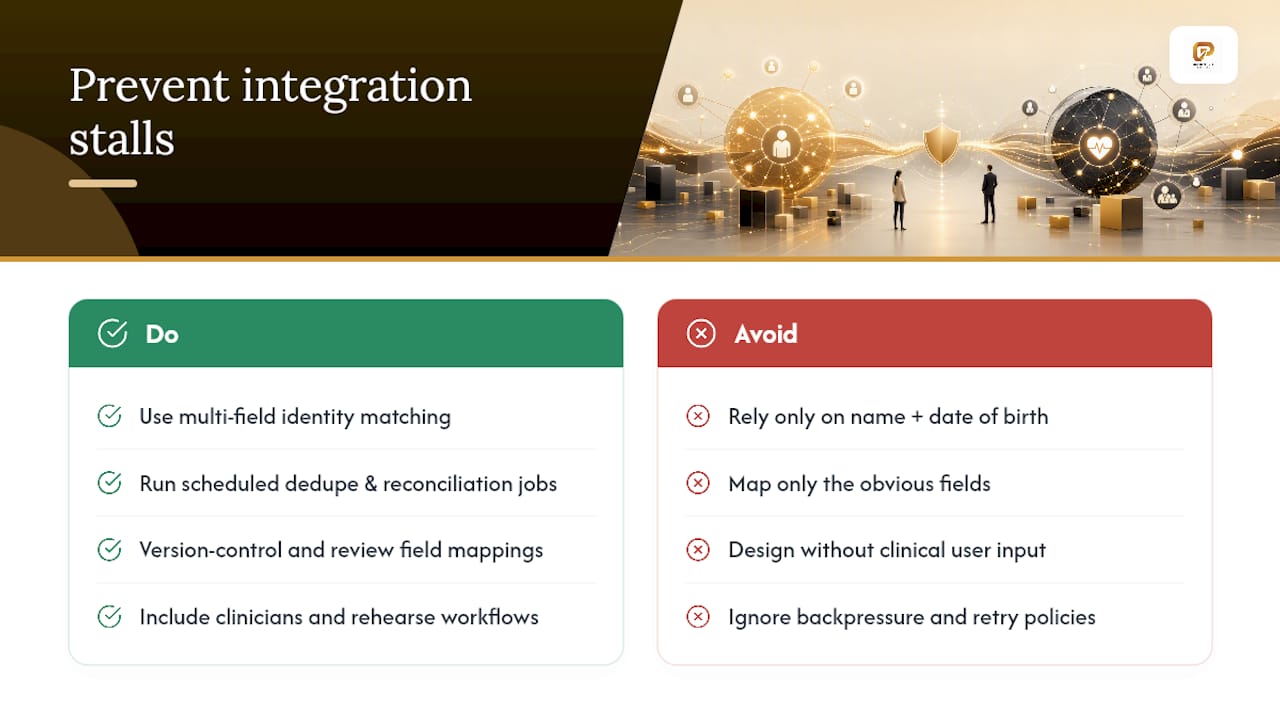
Identity resolution breaks more integration projects than any technical gap. Two systems that don’t agree on which record represents which patient will happily create duplicates, merge the wrong histories, or silently drop updates. Build a dedupe and reconciliation strategy using multiple matching fields, not just name and date of birth, and run it as a scheduled job, not a one-time cleanup.
Under-scoping the field mapping is the second most common failure. Teams map the obvious fields, skip the vendor’s schema quirks (custom fields, deprecated codes, inconsistent date formats), and then spend months chasing sync errors after go-live. Version-controlled mapping documents, reviewed every time the EHR vendor pushes an update, catch this before it becomes a production incident.
Designing without clinical input is a slower failure, but a costly one. A CRM workflow that looks efficient on a whiteboard can add three extra clicks to a nurse’s day, and that friction compounds fast across a busy unit. Bring in clinical champions early and rehearse the actual workflow with the staff who’ll run it daily, not just the department director.
Finally, plan for operational overload. A referral surge or an EHR outage shouldn’t take down your CRM sync. Backpressure handling, retry policies with exponential backoff, and active monitoring keep a temporary spike from becoming a data integrity problem.
Pro Tip: Run your pilot workflow rehearsal with the actual front-desk or care coordination staff, not just IT. They’ll find the friction points a systems architect never will.
How Golden Path Digital Approaches EHR CRM Integration
Golden Path Digital starts every integration with dependency mapping, not code. Before a single field gets synced, the team traces how systems, data flows, and hidden couplings actually connect, the same discipline behind our IBM i modernization work. Skipping this step is how projects discover a legacy dependency mid-build, when it’s expensive to fix.
QuantaPath AI handles the CRM automation layer once that mapping is complete. It automates repetitive workflow tasks (outreach sequencing, data validation, follow-up triggers) while enforcing the privacy controls established during discovery, so automation never outruns your compliance posture. That ordering (map first, automate second) is a deliberate departure from vendors who apply AI before understanding what’s actually connected underneath.
Engagements are pilot-first by design. A pilot-first ROI approach proves the plumbing on one workflow, referral tracking or appointment outreach are common starting points, before committing budget to a full-scale rollout. Early metrics from these pilots typically focus on reduced manual data entry and faster follow-up turnaround, giving decision-makers a concrete basis for the go/no-go decision on wider deployment. That structure keeps risk contained while still delivering a measurable result within weeks, not quarters.
The Bottom Line on Rolling This Out
Integration works when compliance is architecture, not an afterthought bolted on before launch. Sync the minimum necessary fields, gate every workflow through a live consent registry, and authenticate through SMART on FHIR wherever the EHR supports it. Start small.
Your next three moves: run a readiness audit to inventory systems and existing BAAs, pick one clinically meaningful workflow for the pilot, and schedule your penetration test and security risk assessment now, since both take longer to book than most teams expect. A tightly scoped pilot runs 4 to 8 weeks. A multi-site rollout, done in phases with proper monitoring at each stage, typically takes 3 to 12 months depending on how many workflows and locations you’re bringing online.
What I’ve Learned Watching These Projects Succeed and Stall
The projects that go sideways almost never fail on the technical build. They fail because someone decided compliance could catch up after the demo looked good. I’ve seen teams sync a full clinical summary into a CRM because it was easier than scoping the fields properly, then spend months unwinding that decision once a security review flagged it.
The pattern that actually works is almost boring: map dependencies first, scope data tight, pilot one workflow, and resist the urge to expand before the pilot proves out. Speed and compliance aren’t opposites here. The teams that move fastest are the ones who built the guardrails before they needed them, not after an incident forced the conversation.
Ty
Let Golden Path Digital Run Your Pilot
Golden Path Digital is the alternative to a drawn-out, consultant-heavy integration project: instead of months of discovery calls, you get dependency mapping, a scoped pilot, and a working CRM automation layer built on QuantaPath AI, with HIPAA-compliant architecture from day one.

A typical engagement starts with dependency mapping across your EHR and CRM environment, moves into HIPAA-compliant integration design with the consent and audit controls this article covers, and ends with QuantaPath AI automating the workflow you piloted. Deliverables include the field mapping documentation, the security and consent architecture, and a working automation you can measure against real KPIs, not a slide deck.
If you’re ready to scope a pilot workflow, visit the Golden Path Digital team to talk through your current EHR and CRM setup and get a realistic timeline for your first integrated workflow.
Where to Go for Official Guidance
The ONC Health IT Playbook remains the most complete practical resource for implementation steps, stakeholder alignment, and testing frameworks. CMS’s e-health and records priorities page tracks national interoperability initiatives, including the programs shaping FHIR and API requirements going forward. For adoption benchmarks and national trends, HealthIT.gov’s quick stats are updated regularly and worth checking before you build your own business case. Cloud hosting teams should also review current cloud security practices for healthcare environments before finalizing a hosting decision.
Sources
- Health IT Playbook
- CMS e-health/records priorities
- EHR CRM Integration: Streamlining Patient Engagement and Operational Efficiency
FAQ
Is an EHR a CRM system?
No. An EHR is built to document clinical encounters and support care delivery, while a CRM is built to manage relationships, communication, and outreach. Integration connects the two so the CRM can act on clinical context without duplicating the EHR’s function.
What are the top EHR systems used by organizations planning CRM integration?
The market is dominated by a small number of large platforms used across hospitals and physician practices, though specific vendor rankings vary by care setting and organization size. What matters more for integration planning is which standards (FHIR, HL7 v2) and authorization framework (SMART on FHIR) your specific EHR supports.
What does CRM integration mean in a healthcare context?
CRM integration means connecting your customer relationship platform to clinical and administrative systems, usually the EHR, so patient data like appointments, consent status, and care gaps flow automatically instead of requiring manual entry. Done correctly, it follows a minimum necessary data standard and runs through a HIPAA-compliant architecture.
What are EMR CRM tools?
EMR CRM tools are the middleware, APIs, and automation platforms that connect electronic medical records to customer relationship systems, handling field mapping, consent enforcement, and secure data transfer between the two. Golden Path Digital builds this layer through dependency mapping and QuantaPath AI, prioritizing compliance architecture before automation.
How long does a typical EHR CRM integration pilot take?
A tightly scoped pilot focused on one workflow generally takes 4 to 8 weeks from kickoff to measurable results. Full multi-site rollouts take considerably longer, typically 3 to 12 months, depending on the number of workflows and locations involved.