

Healthcare workflow automation cuts administrative time, reduces claim denials, and frees clinicians from repetitive documentation, but only when organizations treat it as a measured pilot rather than a wholesale rip-and-replace. The approach that works is to pick one bounded, high-volume process, automate it with human oversight built in, prove the return, then scale with updated governance.
TL;DR:
- Automating high-volume administrative workflows like intake, pre-authorization, and claims reduces errors, speeds payments, and typically delivers measurable ROI within 90 days.
- Integration quality and mapping dependencies before automation are critical; using FHIR, HL7, or vendor APIs ensures reliable connections with EHR systems.
- Effective pilots should focus on bounded scopes, include human review for at least 60 days, and measure operational, financial, and quality KPIs to prove value.
- Proper governance, including encryption, audit logs, role-based access, and staged testing, is essential to prevent risks when handling protected health information.
- Skipping detailed process mapping and trying to automate too many workflows at once often leads to failure; starting small with a clear owner and metric is the best strategy.
Table of Contents
- What Is Healthcare Workflow Automation, and What Isn’t It?
- Which Healthcare Workflows Deliver the Highest ROI When Automated?
- How Does Healthcare Workflow Automation Connect to Your EHR?
- What Governance and Privacy Controls Does PHI-Handling Automation Require?
- How Do You Run a Pilot-First Automation Rollout?
- Which KPIs Actually Prove Workflow Automation Is Working?
- What Goes Wrong With Healthcare Workflow Automation?
- How Golden Path Digital Approaches Healthcare Workflow Automation
- Why Picking One Pilot Beats Planning the Perfect Program
- Ready to Scope Your First Automation Pilot?
- Sources
- FAQ
What Is Healthcare Workflow Automation, and What Isn’t It?
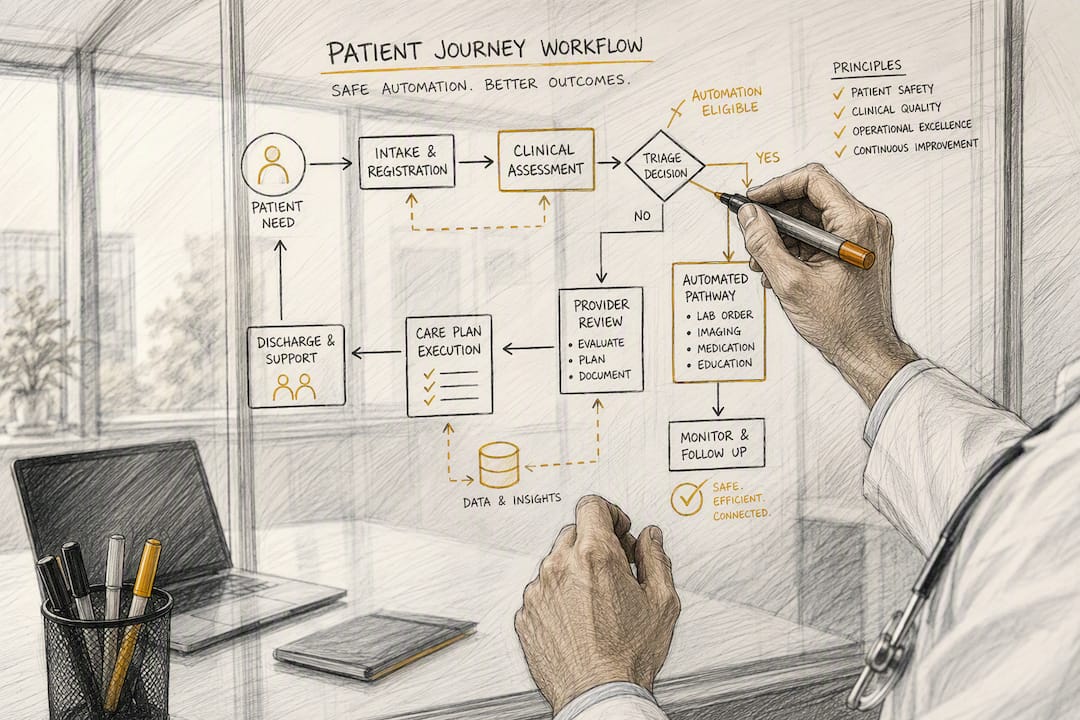
Healthcare workflow automation applies software, rules engines, and increasingly AI to repetitive administrative and operational tasks, so staff spend less time on data entry and more time on patients. It is not a replacement for clinical judgment, and it is not a system that touches diagnosis or treatment decisions without a clinician’s sign-off.
The scope matters more than the technology. Automating administrative processes like intake, scheduling, and claims submission is fundamentally different from automating anything that influences a care decision. The AHRQ workflow assessment toolkit frames this distinction well: before you automate anything, you map the actual workflow, including its exceptions, not the idealized version in a policy document.
Your electronic health record stays the system of record. Automation sits above it, orchestrating tasks, moving data, and drafting content for human review. It does not become a second source of truth, and it does not quietly overwrite what a clinician entered.
A workable definition breaks into three parts:
- Administrative automation: intake forms, eligibility checks, scheduling, claims scrubbing. Low clinical risk, high volume, strong ROI candidates.
- Assistive documentation: AI drafts notes or summaries; a clinician reviews and signs off before anything enters the record.
- Clinical decision support: anything touching diagnosis, treatment selection, or triage. This requires far stricter validation and is outside the scope of a first automation pilot.
Pro Tip: If you can’t describe a workflow’s exceptions in one sentence, it isn’t ready for automation. Map the process first, then decide what to automate.
The safety principle underneath all of this: human-in-the-loop review for at least the first 60 to 90 days of any patient-facing or high-risk automation isn’t a formality. It’s the mechanism that catches the edge cases your process map missed before they turn into a denied claim or a documentation error.
Which Healthcare Workflows Deliver the Highest ROI When Automated?
Not every workflow deserves a place in your first pilot. The workflows below show up repeatedly in industry ROI analyses because they share three traits: high volume, repeatable logic, and a clear metric you can measure within 90 days. Here’s the order most organizations should evaluate them in, prioritized by how fast they typically pay back.
-
Patient intake and registration. Automating intake packets, insurance eligibility checks, and EHR write-back removes the slowest, most error-prone step in the patient journey. Staff no longer retype the same demographic and insurance data across three systems, and eligibility checks that used to require a phone call to the payer now run automatically before the appointment. The risk here is low: get eligibility wrong and you catch it before the visit, not after a claim denial.
-
Appointment scheduling and reminders. Two-way text and voice reminders, combined with automated waitlist matching, reduce no-shows and fill canceled slots without a scheduler manually working the phones. This is often the easiest first pilot because the failure mode is mild. A missed reminder just means the process reverts to how it worked before.
-
Prior authorization. This is where automation earns its reputation. Manual prior auth can take days of phone calls, faxes, and portal logins per case. With payer API integration, developer guides report the same transaction compressed to minutes when the payer supports structured data exchange. Where a payer only offers a web portal, automation still helps by assembling documentation packets automatically, though a human still submits and tracks the request.
-
Claims submission and follow-up. Pre-submission scrubbing catches coding errors and missing fields before a claim ever reaches the payer, which is the cheapest place to fix a denial. Automated denial routing then sends rejected claims to the right specialist instead of sitting in a shared queue, and appeals preparation assembles the supporting documentation automatically.
-
Referral management. Referrals arriving by fax, portal, or EHR message get automatically ingested, acknowledged, and scheduled, with closed-loop reporting back to the referring provider. This closes a gap that causes real harm: referrals that silently disappear because no one tracked whether the patient ever got an appointment.
-
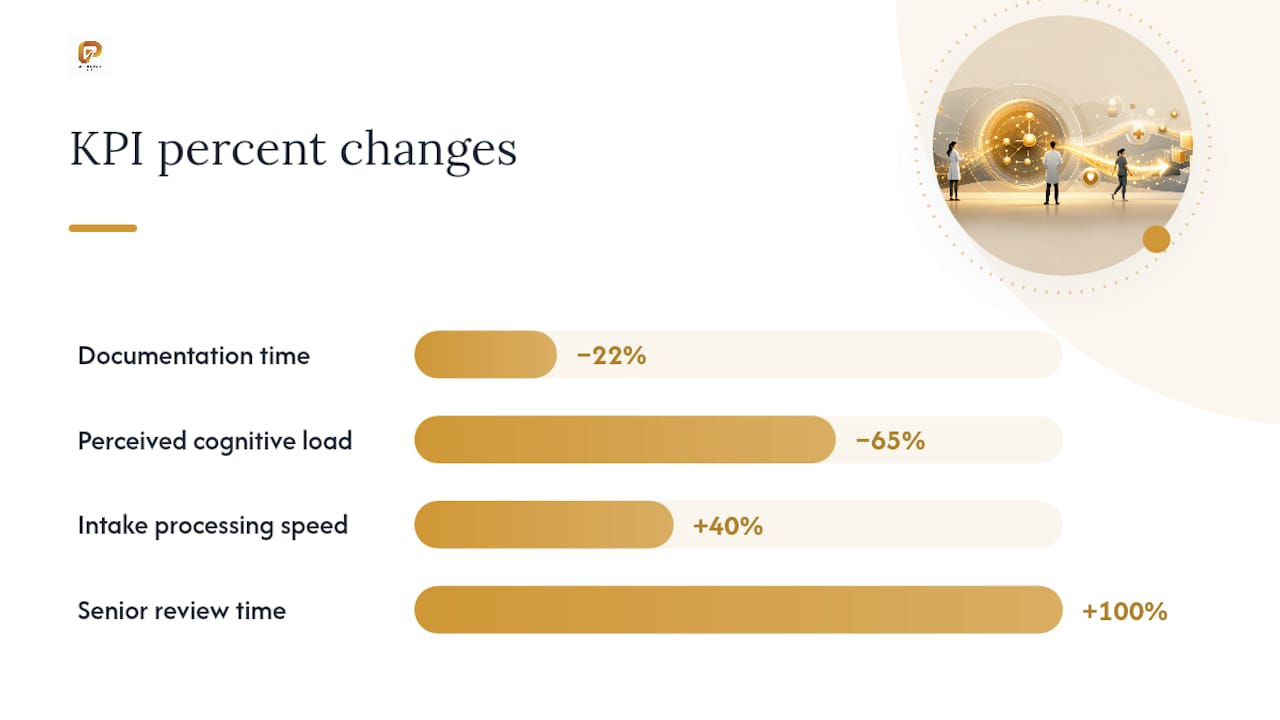
Clinical documentation support. AI scribing tools listen to or transcribe a visit and draft a note for the clinician to review and sign. A 2026 Mercy Health case study using ambient AI assistants reported a 22% reduction in nurse documentation time and a 65% reduction in perceived cognitive load. That second number matters as much as the first. Clinicians didn’t just save minutes; they felt less mentally taxed at the end of a shift.
-
Lab result routing. Automated routing gets results to the ordering provider and flags critical values instead of sitting in a general queue, which shortens the time between an abnormal result and a clinical response.
What connects these seven: every one produces a metric you can defend to a CFO within a quarter, and every one keeps a human in the final decision loop.
- Intake and scheduling automations reduce staff time on repetitive data entry and phone work.
- Prior authorization and claims automations shrink the gap between service delivery and payment.
- Documentation and referral automations reduce clinician burden and close care gaps that otherwise depend on someone remembering to follow up.
The workflows near the bottom of a “not yet” list share a different trait: they’re highly variable, poorly documented, or tied directly to clinical judgment. Save those for after your first pilot proves the model.
How Does Healthcare Workflow Automation Connect to Your EHR?
Automating healthcare processes lives or dies on integration quality. A beautifully designed automation that can’t reliably read from or write to your EHR is a demo, not a production system.
Three integration layers show up across most healthcare automation projects, and production systems typically combine more than one:
- FHIR APIs. The modern standard for structured, real-time data exchange. Expect FHIR where your EHR vendor has invested in a current API surface, and expect it to handle the cleanest, fastest integrations.
- HL7 v2 feeds. Older but still dominant for event-driven data like admissions, discharges, and transfers. Many hospitals will be running HL7 v2 feeds alongside FHIR for years yet.
- Proprietary or vendor-specific APIs. Some systems, particularly older or heavily customized EHR installs, require vendor-specific integration work. This is where legacy system quirks tend to hide, and where a rushed integration causes the most maintenance pain later.
Above these integration layers sits an orchestration and event-routing tier: a normalization layer that translates disparate formats into a consistent internal structure, paired with a subscription model that lets each automation subscribe only to the events it needs. Skip this layer and you end up with point-to-point integrations that break every time one system changes its data format.
Choosing the right automation technique matters as much as the integration pattern. Rules engines and traditional RPA work well for structured, repetitive tasks with clear if-then logic, like routing a claim based on payer ID. Document-extraction machine learning fits unstructured inputs like scanned referral faxes or handwritten forms. AI agents make sense when a task requires judgment across multiple steps, such as assembling a prior authorization packet from scattered chart data, but they need tighter confidence thresholds and human review than a simple rules engine.

Authentication and deployment choices carry real weight too. SMART on FHIR and OAuth-based authorization are becoming the standard for secure, auditable access to patient data, and choosing them over ad hoc credential sharing saves you from a security review nightmare later. Maintenance costs also vary sharply by approach. Payer-facing automations that rely on web scraping rather than APIs typically require 10 to 20 hours of upkeep per payer per year as portal layouts and payer rules shift.
Pro Tip: Ask any automation vendor exactly which integration layer they use for your specific EHR before signing anything. “We integrate with your EHR” means nothing without a FHIR, HL7, or vendor API answer attached. For a deeper look at connecting automation tools to fragmented legacy systems, see this practical guide for IT leaders.
What Governance and Privacy Controls Does PHI-Handling Automation Require?
Any automation that touches protected health information needs a defined governance framework before it goes live, not after. This isn’t optional paperwork. It’s the difference between a defensible program and a breach notification letter.
Start with the contractual layer. Every vendor touching PHI needs a signed Business Associate Agreement that specifies data handling obligations, breach notification timelines, and subcontractor rules. Encryption in transit and at rest should be non-negotiable, and you should be able to name the encryption standard your vendor uses without checking a footnote.
From there, the operational controls:
- Immutable audit logs. Every access, edit, and automated action touching PHI needs a timestamped, tamper-resistant record. If you can’t answer “who touched this record and when” in seconds, your audit trail has a gap.
- Role-based access control. Automation accounts should have the narrowest permission scope that lets them function, not broad administrative access “to be safe.”
- Confidence thresholds and explicit human-review rules. Any AI-assisted step below a defined confidence threshold routes to a human, automatically, with no silent fallback to “probably fine.”
- Escalation paths. A named owner for exceptions, not a shared inbox that becomes a graveyard for edge cases.
- Change control and monitoring cadence. Version changes to automation logic get reviewed and logged, with a regular cadence for checking drift in accuracy or volume.
- Incident response plan. Defined before the first incident, not drafted during one.
The PMC research on accelerating workflow automation in health care points to governance and staged testing as the difference between programs that scale safely and ones that generate new risk faster than they remove old friction. Golden Path Digital builds these controls, including BAA management, encrypted data flows, and access logging, into its HIPAA-compliant AI deployment approach for exactly this reason: governance has to be present at design time, not bolted on before an audit.
How Do You Run a Pilot-First Automation Rollout?
Choosing the right pilot determines whether your automation program succeeds or quietly dies after six months of scope creep. The right pilot has four traits: high volume, repeatable logic, a metric you can measure in weeks rather than quarters, and one named, accountable owner who isn’t juggling five other priorities.
A 30/60/90-day structure keeps a pilot from sprawling:
- Days 1 through 30: Discovery and mapping. Document the actual current workflow, including every exception path staff currently handle manually. Identify the integration layer you’ll need (FHIR, HL7, or a vendor API), and define your success metric before you write a line of automation logic.
- Days 31 through 60: Build and test. Build the automation against a limited volume slice, run it in parallel with the manual process rather than replacing it outright, and route every low-confidence output to a human reviewer.
- Days 61 through 90: Monitor and expand. Compare pilot metrics against your baseline, tighten confidence thresholds based on real error patterns, and only then expand volume or scope.
Budget expectations vary by ambition. Industry-reported figures put pilot audits and prototypes below full production integrations, which add EHR connectivity, security review, and scaled monitoring and grow with scope. Set a ceiling for the pilot, and treat the production integration as what you’re actually deciding to invest in once the pilot proves out.
| Pilot phase | Primary focus | Exit criteria to move forward |
|---|---|---|
| Days 1 to 30 | Map workflow and exceptions, choose integration layer | Baseline metric documented, owner assigned |
| Days 31 to 60 | Build against limited volume, run in parallel | Error rate within threshold, human review functioning |
| Days 61 to 90 | Monitor at scale, refine thresholds | Metrics beat baseline, governance updated for scale |
Before scaling past the pilot, revalidate every metric against your original baseline, update governance documentation to reflect the larger volume and any new exception types you discovered, and keep a frozen fallback to the manual process for at least one full review cycle after go-live. That fallback isn’t pessimism. It’s the same human-in-the-loop discipline that protected your pilot, applied to the moment when things are most likely to break: the scale-up.
Which KPIs Actually Prove Workflow Automation Is Working?
Speed alone is a misleading metric. An automation that processes tasks faster but generates a pile of exceptions nobody resolves hasn’t improved anything. It’s moved the bottleneck and hidden it.
Three categories of KPIs give you the full picture:
- Operational KPIs: time-to-complete per task, overall throughput, and the count of unassigned or aged work items sitting in a queue.
- Financial KPIs: claim denial rate, time-to-payment, and staff hours converted into measurable FTE capacity freed up for other work.
- Quality and experience KPIs: staff satisfaction with the new process, patient satisfaction, and the actual error rate compared to the manual baseline.
The Mercy Health documentation pilot is instructive here because it tracked both a time metric and a burden metric. The 22% reduction in documentation time paired with a 65% drop in perceived cognitive load tells you the automation didn’t just move faster, it reduced the mental tax of the work itself. A time-only metric would have missed that second, arguably more important, result.
The AHRQ toolkit’s guidance on net impact applies directly here: measure exception-handling overhead and review time alongside your speed gains, because that overhead is real labor cost that offsets the automation’s headline number. If your intake automation processes cases 40% faster but doubles the time your senior staff spend reviewing flagged exceptions, you haven’t achieved a 40% gain. You’ve shifted where the work happens, and you need to know that before you report success to leadership.
What Goes Wrong With Healthcare Workflow Automation?
Most failed automation projects share a root cause: the process being automated was never well defined to begin with. If three staff members describe a workflow three different ways, automating it locks in confusion rather than removing it. Redesign the process first, then automate the redesigned version.
The technical failure modes compound this. Rules-based automation and RPA break when an upstream system changes a field format or a payer updates a portal layout, and that brittleness shows up as silent failures if nobody’s monitoring for it. AI-driven steps carry a different risk: hallucinated or overconfident outputs that look plausible but are wrong, which is exactly why confidence thresholds and mandatory human review aren’t optional extras.
There’s also an operational trap that catches teams by surprise: an automation that generates a growing pile of exceptions nobody owns. The volume didn’t shrink, it just moved into a queue that requires its own staffing and governance.
Mitigations that actually work:
- Keep pilots bounded in volume and scope until the error pattern is understood.
- Audit a sample of automated outputs regularly, not just when something visibly breaks.
- Build in iterative improvement cycles rather than treating the initial build as final.
- Assign a named owner to the exception queue from day one, with a real time allocation, not a side task.
How Golden Path Digital Approaches Healthcare Workflow Automation
Golden Path Digital’s approach to automation starts from the same discipline that runs through this entire guide: map dependencies before you apply AI. Its flagship products reflect that philosophy in different domains. AS/Forward parses and analyzes IBM i RPG codebases to expose dependencies before any modernization work touches production logic. Laravel Ascend automates framework upgrades with the same emphasis on understanding what depends on what before changing anything. QuantaPath AI extends that structured, dependency-aware method into CRM and workflow automation, with privacy compliance built into the deployment rather than added afterward.
That sequencing, dependency mapping first, bounded pilot second, scaled production third, maps directly onto the pilot-first model this article recommends for clinical and administrative workflows. Organizations that skip the mapping step tend to automate the wrong things, or automate the right things in a way that breaks the moment volume scales.
Clients working with Golden Path Digital report gains that align with what a disciplined automation program should deliver:
- Higher operational efficiency from automating repetitive administrative tasks.
- Lower consulting costs by reducing dependence on ongoing, open-ended integration work.
- Better visibility into how legacy systems and modern automation layers actually connect.
The through line across every engagement, whether it’s an IBM i modernization project or a workflow automation pilot, is the same: know the dependencies, prove the model on a bounded scope, then scale with confidence instead of guesswork.
Why Picking One Pilot Beats Planning the Perfect Program
The biggest mistake I see in healthcare automation planning isn’t technical. It’s strategic paralysis dressed up as thoroughness. Organizations spend six months building a comprehensive automation roadmap covering twelve workflows, three EHR integrations, and a governance framework that reads like a compliance textbook, and by the time it’s approved, nothing has shipped and nothing has been measured.
The data throughout this guide points somewhere more useful: pick the one workflow with the clearest volume, the clearest owner, and the clearest metric, and run it for 90 days. Prior authorization and clinical documentation both show measurable, defensible returns because someone bounded the scope and tracked a real number instead of a projected one. A perfect twelve-workflow roadmap that never launches delivers exactly zero of that value.
What administrators underestimate most is how much the human-in-the-loop requirement protects the program politically, not just operationally. Staff trust an automation more when they know a person reviews the edge cases, and that trust is what determines whether your pilot gets the internal support to scale past 90 days.
Stop planning the comprehensive program. Pick one bounded pilot with a named owner, measure it honestly, including the exception overhead, and let the results make the case for what comes next.
Ty
Ready to Scope Your First Automation Pilot?
You’ve seen what separates a workflow automation program that pays for itself from one that generates a queue of unresolved exceptions and a shrug from finance. The difference is almost always what happens before a single line of automation logic gets written: understanding your actual dependencies, not the ones in the process diagram from three years ago.

Golden Path Digital scopes healthcare workflow automation the same way it approaches legacy code modernization: dependency mapping first, so the pilot you build reflects how your systems actually behave, not how the vendor brochure assumes they behave. That means assessing your EHR integration points, defining a bounded pilot with a real owner and a real metric, and building with QuantaPath AI’s privacy-compliant automation layer so governance is part of the design from day one, not a retrofit. The path runs assessment, then scoped pilot, then production transition, with measurable checkpoints at each stage instead of a leap straight to enterprise rollout.
If you’re ready to scope a pilot instead of another planning document, start with an assessment at Golden Path Digital and get a concrete answer on what your first 90 days should look like.
Sources
- Mercy nurses cut documentation time 22% with Microsoft AI: Becker’s Hospital Review
- Priorities to accelerate workflow automation in health care: PMC
- Workflow assessment health IT toolkit: AHRQ Digital
- Healthcare Workflow Automation With AI Checklist: KUMO
This article is general information, not a substitute for advice from a qualified doctor. Consult a qualified healthcare professional about your own circumstances before acting on anything here.
FAQ
What Is Workflow Automation in Healthcare?
It’s the use of software, rules engines, and AI to handle repetitive administrative and operational tasks, like intake, scheduling, and claims processing, so staff spend less time on manual data work and more time on patient-facing care.
What Are Examples of Workflow Automation?
Common examples include automated appointment reminders, insurance eligibility checks run before a visit, prior authorization document assembly, and AI-assisted clinical note drafting that a clinician reviews before it enters the record.
What Is an Example of a Workflow in Healthcare?
A referral workflow is a clear example: a referral arrives from another provider, gets acknowledged automatically, triggers a scheduling request, and generates a closed-loop status update back to the referring physician once the patient is seen.
What Is an Example of Automation in Healthcare?
Prior authorization automation is one of the clearest examples. Payer API integration can compress a process that once took days of phone calls and faxes down to minutes for supported payers.
How Long Should a Healthcare Automation Pilot Run Before Scaling?
Most organizations should run a pilot for 90 days, with the first 60 to 90 days keeping a human reviewer in the loop for every high-risk or patient-facing decision before expanding scope or volume.