

Modularize by domain inside your existing deployable app, enforce boundaries with interfaces and architecture tests, and migrate incrementally, starting with your lowest-risk components. That is laravel monolith modularization done right. The techniques that make it work, module service providers, per-module migrations, and domain events, get concrete in the sections below, along with a step-by-step plan for moving a production app there safely.
TL;DR:
- Modules should expose interfaces with dependency injection to prevent direct access to domains, Infrastructure, or models across boundaries, enforced by architecture tests in CI.
- Each module requires its own folder structure, service provider, and migrations, with schema changes traveling with the domain logic it belongs to, not shared in global migration folders.
- Cross-module communication should primarily use in-process method calls via contracts, reserving events for side effects, and queues only for long-running or isolating tasks.
- Breaking down an existing Laravel monolith should start with dependency mapping, moving low-risk modules first, and implementing architecture tests before incrementally extracting background processes.
- Avoid shared Kernel code, leaking models, or premature use of queues, and only split into microservices when boundaries are stable for multiple releases, owned end to end by a dedicated team, and require independent scaling.
Table of Contents
- What Is a Modular Monolith and Why Choose One?
- How Do You Organize Folders and Code in a Modular Laravel App?
- How Do You Enforce Boundaries Between Modules?
- How Should You Handle Data Ownership Across Modules?
- What’s the Right Way for Modules to Communicate?
- How Do You Test a Modular Monolith Correctly?
- How Do You Migrate an Existing Laravel Monolith Step by Step?
- What Pitfalls Should You Watch For When Modularizing Laravel?
- Why Modular Monolith First Beats Rushing to Microservices
- Where Golden Path Digital Fits Into Your Modularization Plan
- Sources
- FAQ
What Is a Modular Monolith and Why Choose One?
A modular monolith keeps everything in one codebase and one deployment, but organizes it around business domains, or bounded contexts, instead of technical layers. Orders code lives together. Inventory code lives together. Each module owns its own domain logic, and that logic stays separated from framework plumbing rather than scattered across shared controllers and helper classes. This is laravel domain driven design applied without the operational weight of distributed systems.
The trade-offs favor the monolith more often than teams assume:
- Deploys stay atomic. One release, one rollback, no version-skew between services.
- Database transactions stay ACID across a request, which vanishes the moment you split a workflow across network calls.
- Debugging a request means reading one stack trace, not stitching together logs from five containers.
- Infrastructure and ops costs stay low. No service mesh, no distributed tracing platform, no extra on-call rotation.
Microservices earn their complexity when a specific domain needs to scale independently of everything else, when boundaries have proven stable for months, and when a dedicated team owns that boundary end to end, as explained in Growing a SaaS Without Breaking Systems, Alytics, The Perfect Saas Template. Absent those conditions, splitting early usually creates a distributed monolith. That is worse than the thing you were trying to fix.
How Do You Organize Folders and Code in a Modular Laravel App?
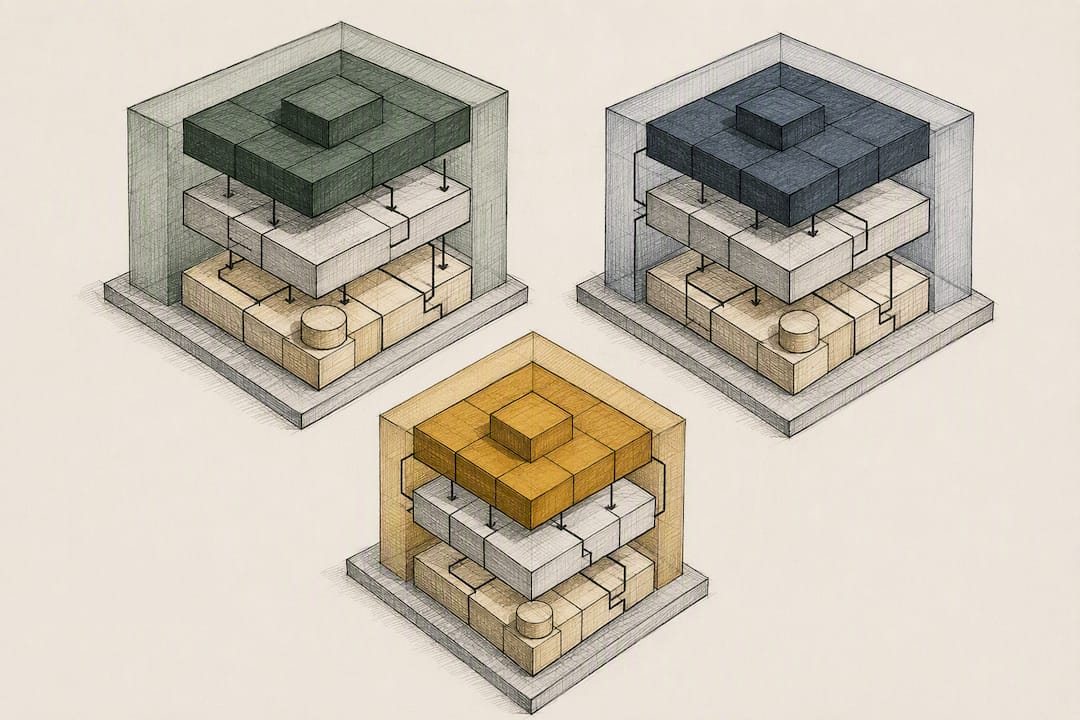
Structure follows domain, not Laravel’s default MVC buckets. A workable Laravel application structure puts each bounded context under its own root, with internal layering inside:
src/
  Orders/
    Domain/
    Application/
    Infrastructure/
    UI/
    OrdersServiceProvider.php
  Inventory/
    Domain/
    Application/
    Infrastructure/
    UI/
    InventoryServiceProvider.php
  SharedKernel/
This layout, with Domain, Application, Infrastructure, and UI folders inside each module, mirrors the clean architecture pattern documented for Laravel, which keeps domain logic ignorant of Eloquent and HTTP concerns entirely.
To wire it up:
- Register each module’s namespace in
composer.jsonunderautoload.psr-4, e.g."Modules\Orders\": "src/Orders/". - Give every module a
ServiceProviderthat boots routes, migrations, and container bindings, then register it inbootstrap/providers.php(or your provider array). - Keep migrations inside each module’s
Infrastructure/Database/Migrationsfolder and load them from that module’s provider withloadMigrationsFrom(). That is the migration-in-module pattern: schema changes travel with the domain that owns them, not in one globaldatabase/migrationsfolder. - Route files, controllers, and Eloquent models stay inside the module’s
UIandInfrastructurefolders respectively, never in the app’s top-levelapp/Httptree.
A reference repository showing this exact bootstrapping, module providers, route loading, and per-module migrations, is worth cloning before you write your first module from scratch.
How Do You Enforce Boundaries Between Modules?
Folder structure alone is not architecture. Dependency direction and contracts are the actual architecture, and folders just make it easier to see if you are violating it.
Each module should expose a thin public interface at its root, something like ModulesOrdersContractsOrderRepository, and bind the real implementation inside that module’s service provider. Other modules depend only on the interface, resolved through Laravel’s container, never on the concrete class.
Three rules keep this from decaying:
- A calling module may only import from another module’s
Contractsnamespace, never itsDomain,Infrastructure, or Eloquent models directly. - Every cross-module dependency gets bound and resolved through the container, so swapping an implementation never touches the calling code.
- Architecture tests run in CI on every pull request, not just in code review.
For that last rule, Pest’s arch() helper or Deptrac rules can assert things like “Orders must not depend on InventoryInfrastructure” and fail the build the moment someone violates it. That kind of mechanical enforcement carries more leverage than review discipline, because reviewers get tired and CI never does.
How Should You Handle Data Ownership Across Modules?
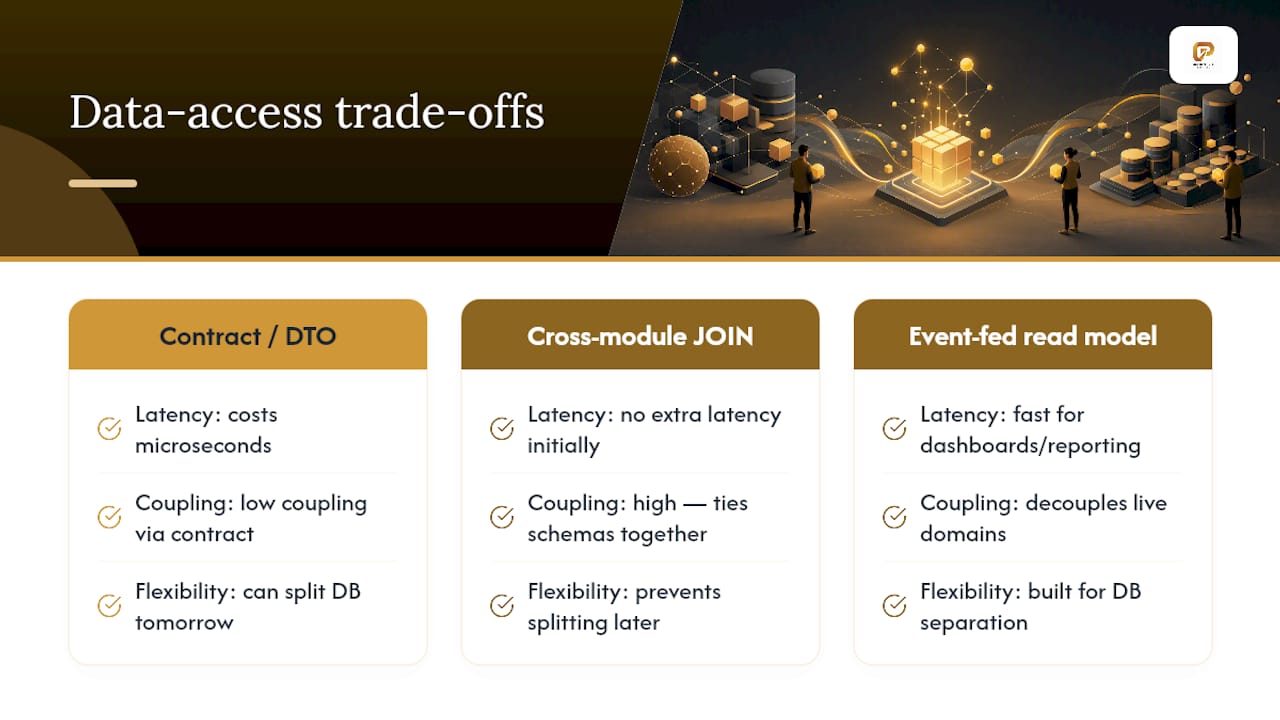
Give every module its own tables, and resist the pull to add a foreign key or JOIN that crosses domain boundaries. That cross-module foreign key is usually the first crack in a modular monolith, because it silently ties your Orders schema migration to Inventory’s release schedule.
When Orders needs data that Inventory owns, reach for a contract method, a DTO, or a small read model built specifically for that query, rather than querying Inventory’s tables directly. Practitioner guidance on data ownership treats this as the hardest coupling to break precisely because the database sits underneath every module and makes shortcuts tempting.
There is a real latency trade-off here. A contract call through the container costs microseconds; a direct JOIN costs nothing extra until the day you need to split that table onto its own database, at which point the JOIN is the reason you can’t. For dashboards or cross-domain reporting that genuinely need speed, build a dedicated reporting table or materialized read model fed by domain events, instead of reaching across boundaries live.
Pro Tip: Ask yourself whether a module could run against its own separate database tomorrow. If the answer is no because of a JOIN, that JOIN is the coupling you need to fix first.
What’s the Right Way for Modules to Communicate?
Most calls between modules should be plain, injected, in-process method calls through a contract interface. It’s fast, it’s synchronous, and it’s easy to debug, so default to it unless you have a specific reason not to.
Reach for Laravel’s event system when one action needs to trigger side effects the originating module shouldn’t know about. OrderPlaced firing a listener in Inventory that decrements stock is a clean example: Orders doesn’t need to know Inventory exists, it just dispatches an event. Domain events dispatched this way inside a single process double as a cheap rehearsal for the asynchronous communication you would need if that module ever gets extracted into its own service.
Queues and message brokers earn their place only when you need real isolation, long-running work that shouldn’t block a request, or a module with a genuinely different scaling profile than the rest of the app. Introduce them for those specific reasons:
- Sending export jobs or report generation that takes seconds or minutes.
- Isolating a flaky third-party integration so its failures don’t cascade.
- Giving a high-traffic module (like inventory sync) its own worker pool.
Skip the queue for anything that finishes in milliseconds and doesn’t need that isolation. Adding a broker “for scalability” before you have a scaling problem is how simple modular Laravel design patterns turn into unnecessary distributed systems.
How Do You Test a Modular Monolith Correctly?
Architecture tests are the backbone. A sample rule looks roughly like this in plain terms: “Module A must never reference Module B’s Domain or Infrastructure namespace.” Written with Pest’s arch() helper, these checks run in milliseconds and catch a boundary violation the moment it’s committed, long before a human reviewer would notice a stray import.
A workable testing setup for modular Laravel apps layers three kinds of tests:
- Unit tests inside each module that exercise Domain logic with zero framework dependencies.
- Integration tests per module that hit the database and container bindings for that module alone.
- Smoke tests that validate cross-module contracts actually resolve correctly and that every module’s migrations load cleanly together.
Run the architecture tests on every pull request and treat a failing boundary check exactly like a failing unit test: it blocks the merge, full stop. Without that gate, boundaries drift within a few sprints, because nothing stops a developer under deadline pressure from importing the model that’s “right there.”
How Do You Migrate an Existing Laravel Monolith Step by Step?
Breaking monoliths in Laravel works best as a sequence of small, reversible moves rather than one large rewrite. Here’s the order that keeps risk low:
- Map dependencies first. Diagram which controllers call which services, which tables get read and written by which features, and who owns each piece of logic today. This step alone usually reveals two or three bounded contexts that were invisible in the tangled code.
- Pick one small, low-risk module and move it. A read-heavy reporting feature or a rarely-changed settings module is a good first candidate. Create its folder, its service provider, its own migrations, and a contract interface for anything other code still needs from it.
- Add architecture tests and CI enforcement immediately, then fix whatever violations they surface. You will find more than you expect on the first run.
- Extract heavy background jobs and workers before touching synchronous request paths. Export jobs, notification dispatchers, and batch processors are lower risk to move first and validate the queue and event patterns you’ll reuse for everything else. Repeat module by module from there.
Validate every step with feature flags that let you route traffic to the new module gradually, canary deploy the change to a slice of users first, and keep a documented rollback path, usually just reverting the provider registration, ready before you ship.
Pro Tip: Start with dependency mapping and pull background workers into their own module before you touch anything synchronous. It’s the lowest-risk way to prove the pattern works in your codebase before you bet a core feature on it.
What Pitfalls Should You Watch For When Modularizing Laravel?
The biggest failure mode isn’t technical, it’s discipline eroding under deadline pressure. A few specific traps show up in almost every laravel monolith refactor:
- SharedKernel becomes a junk drawer. Anything reused by two modules gets dumped there until it’s importing half the codebase. Set a hard rule: only truly domain-agnostic code (value objects, base exceptions) belongs in Shared, and review additions to it explicitly.
- Eloquent models leak across module boundaries. Passing an
Ordermodel into Inventory’s code creates silent coupling that architecture tests won’t always catch. Pass a DTO or an ID and let the receiving module look up its own data. - Queues and sagas get added before they’re needed. Complex async patterns solve problems you don’t have yet and add debugging overhead you’ll regret. Keep communication as simple in-process calls until a concrete requirement forces otherwise.
Why Modular Monolith First Beats Rushing to Microservices
Most Laravel teams reach for microservices because it sounds like the mature choice, not because they’ve hit a wall a modular monolith can’t clear. In practice, the folder structure and architecture tests described above solve the actual problem, tangled ownership, months before a team needs the operational overhead of separate deployments.
Before extracting anything into its own service, run through a short checklist: has this boundary stayed stable for at least a few release cycles, does it genuinely need to scale independently, and does a specific team already own it end to end? If any answer is no, keep it inside the monolith.
Golden Path Digital’s dependency-mapping-first methodology reflects this same instinct: map what actually depends on what before applying automation or extraction, rather than guessing. That order of operations, mapping before restructuring, is the difference between a clean migration and a six-month fire drill.
Ty
Where Golden Path Digital Fits Into Your Modularization Plan
Dependency mapping is the step teams skip, and it’s the step that turns a modular monolith refactor from a gamble into a plan. Golden Path Digital builds that mapping into its process before any automation runs, which means you know exactly which modules are safe to extract first instead of discovering it mid-migration.

If your monolith also carries an aging Laravel version underneath all that domain logic, Laravel Ascend automates the upgrade path from version 6 through 11, so you’re not modularizing on top of a framework that’s about to fall out of support. Pair that with a structured legacy code modernization engagement built around dependency mapping first, and you get a migration roadmap scoped to your actual codebase rather than a generic checklist. Reach out to Golden Path Digital to get a dependency map of your Laravel monolith before you write the first module folder.
Sources
- Modular Monolith with Clean Architecture in Laravel
- Modular monolith in Laravel: enforcing bounded contexts without a microservices tax
- avosalmon/modular-monolith-laravel
FAQ
What Is the Difference Between a Modular Monolith and Microservices?
A modular monolith deploys as one unit with domains separated by code boundaries, while microservices deploy each domain independently with its own database and network calls between services.
Do I Need Domain-Driven Design to Modularize a Laravel App?
No, but borrowing its core idea, organizing code around bounded contexts instead of technical layers, is what makes laravel domain driven design useful even in a single-deployment app.
Should Migrations Live Inside Each Module?
Yes. The migration-in-module pattern keeps each module’s schema changes loaded by that module’s own service provider, so ownership and version history stay with the domain that owns the data.
When Should I Actually Split a Module Into a Microservice?
Only after the boundary has stayed stable for several release cycles, a specific team owns it end to end, and it needs to scale or deploy independently of the rest of the app.
How Do I Start Modularizing a Large Existing Monolith?
Map dependencies first to find your real bounded contexts, then extract one low-risk module, add architecture tests to CI, and move background workers before touching synchronous request paths. A dependency-mapping-first modernization approach reduces the guesswork in that first step.