

Workflow orchestration sequences API-connected systems end-to-end, while RPA automates screens when no API exists. If a system exposes an API, orchestration should be the default choice. RPA earns its place only as a bridge for legacy screens you cannot integrate any other way, or as a short-term stopgap while a real integration gets built.
TL;DR:
- Most automation projects should use orchestration for systems with APIs, while RPA is suitable only for legacy screens with no programmatic access.
- RPA depends on UI stability and requires active monitoring, since interface changes can silently break bots, unlike stable API contracts used in orchestration.
- For processes spanning multiple days or involving multiple systems and human approval, orchestration provides greater stability and observability.
- Maintaining RPA bots often incurs higher long-term costs due to interface changes, so dependency mapping and automated testing are essential to reduce technical debt.
- Combining RPA and orchestration commonly involves RPA bridging into orchestrated flows or AI agents managing unstructured inputs, with most projects starting by auditing system integration surfaces.
Table of Contents
- Workflow Orchestration vs RPA: What Each One Actually Does
- What Is Robotic Process Automation (RPA)?
- What Is Workflow Orchestration?
- RPA vs Workflow Automation: The Practical Differences That Matter
- How to Decide Between RPA, Orchestration, or Both
- Integration Patterns: How Orchestration and RPA Work Together
- What RPA and Orchestration Really Cost to Build and Maintain
- What Enterprise Teams Get Wrong About Choosing Between Them
- How Golden Path Digital Approaches Orchestration and Legacy Automation
- Sources
- FAQ
Workflow Orchestration vs RPA: What Each One Actually Does
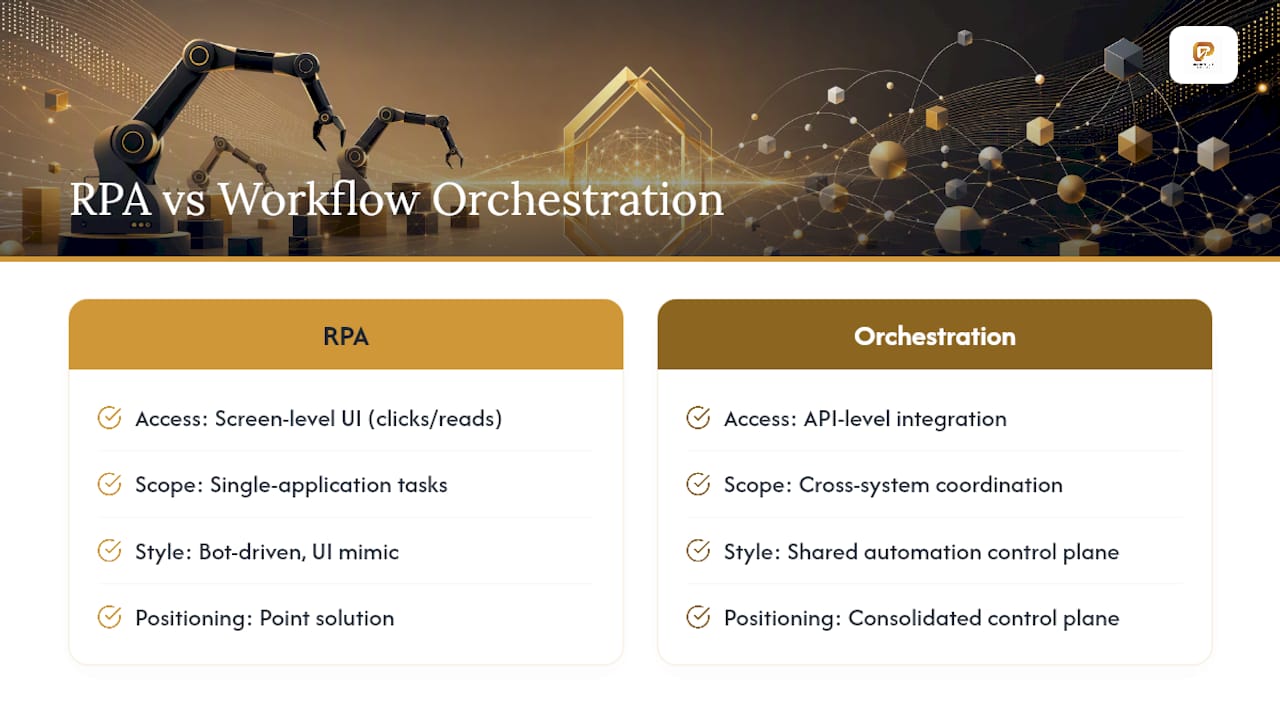
The confusion between these two categories usually comes from a false premise: that they compete for the same job. They don’t. RPA reaches into applications the way a person would, clicking buttons and reading fields on screen. Orchestration talks to systems through their APIs, coordinating a process across many of them at once. Gartner’s own market framing backs this convergence trend, describing business orchestration and automation technologies as a consolidated control plane that spans RPA, integration, document processing, and low-code development under one roof rather than treating them as rivals.
That framing matters for how you scope a project. Ask which system you’re touching has an API before you ask which tool automates it best.
What Is Robotic Process Automation (RPA)?
RPA drives software the way a person does: reading screen fields, clicking buttons, typing into forms. Bots operate on the presentation layer of an application, not its underlying data or logic, which is exactly why RPA became the go-to fix for terminal-based order systems, mainframe green screens, and desktop tools that were never built with integration in mind.
That approach shines in a narrow set of conditions:
- Legacy applications with no exposed API, export function, or database access
- Terminal or mainframe screens where exact keystroke-by-keystroke replication matters for audit trails
- Short-lived tasks where building a real integration isn’t worth the investment
The tradeoff is fragility. RPA depends on UI structure, so a moved button, a renamed field, or a software update can silently break a bot’s script. That failure is often quiet. Nobody gets an error message; the bot just starts processing garbage or stops running, and someone downstream notices weeks later when reports look wrong. Any RPA deployment needs active monitoring, not a “set it and walk away” mindset, because the interface it depends on was never designed to stay still.
Pro Tip: Log every RPA bot’s run history and monitor for silent failures promptly. A bot that stops updating a spreadsheet is often worse than one that crashes loudly, because nobody notices until the data gap shows up in a report.
What Is Workflow Orchestration?
Workflow orchestration coordinates systems through APIs, webhooks, and message queues, using a stateful engine that tracks where a process stands even if it runs for days or weeks. Instead of clicking through a screen, an orchestration platform calls an endpoint, waits for a response, branches based on that response, and hands the next step to another system or a human reviewer.
That architecture produces three durable advantages over screen automation:
- Stability, since API contracts are versioned and change on a predictable schedule instead of shifting without warning
- Built-in observability and audit logging, which orchestration platforms generally provide out of the box
- Native support for long-running, multistep processes that span days, not just quick single-session tasks
Pro Tip: If a process spans more than one business day, involves a human approval step, or touches more than three systems, orchestration should be your starting assumption, not RPA.
Orchestration is the right default whenever the systems involved expose any kind of programmatic access. The exceptions are narrow enough that they deserve their own decision framework, which is where RPA still earns its keep.
RPA vs Workflow Automation: The Practical Differences That Matter
Choosing between the two comes down to a handful of concrete axes, not abstract philosophy. Here’s where they actually diverge:
- Integration surface: Orchestration reaches any system with an API; RPA reaches anything with a screen, including systems with neither.
- Stability: API contracts change on a schedule and get versioned; UI layouts change without notice and break bots silently.
- Maintenance load: Workflow automation typically carries a lower ongoing maintenance burden than RPA, which needs regular script updates as interfaces shift.
- Time to value: RPA can go live faster on a single legacy screen; orchestration takes longer to map but scales across dozens of processes without rework.
- Auditability: Orchestration logs are structured and machine-readable by default; RPA audit trails depend on what the bot happens to capture from the screen.
Picture two invoice workflows. One pulls data from an ERP with a REST API, validates it against a rules engine, and routes exceptions to a human. That’s orchestration, and it should stay that way. The other pulls the same data from a 20-year-old AS/400 green screen with no export function. That’s a legitimate RPA case, at least until someone builds a proper interface.
How to Decide Between RPA, Orchestration, or Both
Most enterprise automation debates get resolved not with a framework meeting but with a spreadsheet. A simple audit listing each system’s integration surface, whether it’s a REST API, a webhook, a scheduled export, direct database access, or nothing at all, settles the vast majority of “RPA or orchestration” arguments before they start.
Run it in four steps:
- Inventory every system touched by the process and record its integration surface in one column: API, webhook, export, database, or none.
- Route anything with an API, webhook, or database connection to orchestration. This is the default path and should cover most of your list.
- Route anything with no programmatic access to RPA, but flag it for an integration backlog review rather than treating the bot as permanent infrastructure.
- Route unstructured inputs, like scanned documents, free-text emails, or handwritten forms, to an intelligent document processing layer or an AI agent supervised by your orchestrator.
Pro Tip: Treat every RPA bot as a ticket in your integration backlog, not a finished project. Teams that let RPA harden into permanent infrastructure end up paying more in the long run than teams that budget for the real integration up front.
Whoever owns this decision, usually an automation center of excellence, should also own testing standards and governance for both categories. Orchestration failures tend to be loud and traceable to a specific API change; RPA failures tend to be quiet and traceable to nothing in particular unless someone was watching.
Integration Patterns: How Orchestration and RPA Work Together
Pure RPA shops and pure orchestration shops both exist, but most mature automation programs run a blend. Hybrid patterns are common in practice, and three show up more often than any others:
- RPA as a bridge into an orchestrated flow. A bot extracts invoice data from a legacy ERP screen and hands it to an orchestration engine, which validates, routes, and archives it through modern APIs from that point forward.
- Orchestration plus iPaaS as the enterprise backbone. Integration platform as a service tools sync SaaS applications with on-premises systems, while the orchestrator manages the business logic and sequencing on top.
- Orchestrator-managed AI agents alongside RPA. The orchestrator delegates unstructured decision steps to an AI agent, while robots still handle the one or two legacy screens nothing else can reach.
Each pattern keeps RPA in its narrow lane, which is exactly where it holds up best.
What RPA and Orchestration Really Cost to Build and Maintain
Timelines and maintenance are where most automation budgets go wrong. Workflow automation generally has a shorter build time and lighter ongoing maintenance load than RPA, which frequently needs updates every time a target application changes its interface. RPA’s technical debt accumulates quietly: each bot is a standalone script tied to a UI snapshot, and nobody notices the cost until three bots break in the same week after an unrelated software patch.
Two practices cut that risk substantially:
- Dependency mapping before automation, so you know exactly which fields and screens a bot depends on and what breaks if they change.
- Automated regression testing on a schedule, so UI drift gets caught by a test suite instead of by an angry customer three weeks later.
What Enterprise Teams Get Wrong About Choosing Between Them
By Ty, Golden Path Digital
Automation is treated as a checklist and mapping is skipped. Skip the audit and you’ll rebuild half your bots in eighteen months, once the “temporary” RPA layer somehow becomes load-bearing infrastructure nobody dares touch.
Governance also gets applied unevenly. Companies write detailed testing standards for orchestration because API failures are visible and embarrassing, then leave RPA bots running unmonitored because their failures are quiet. That’s backward. The silent failure mode is the more expensive one, because it hides the damage until someone downstream notices a report doesn’t add up.
The reader’s real job is mapping the integration surface of every system in a process before touching any automation tool. Golden Path Digital builds that same dependency-first discipline into legacy modernization work, because the pattern holds everywhere: you cannot make a good automation decision about a system you haven’t mapped.
Ty
How Golden Path Digital Approaches Orchestration and Legacy Automation
Dependency mapping is treated as the first step, not an afterthought, on every modernization and automation engagement. For teams running legacy IBM i and RPG systems, that means understanding exactly what each program touches before deciding whether the fix is an API, an integration layer, or a targeted bot.

That approach runs through three phases: an assessment that maps the actual integration surface, a pilot that proves the orchestration or modernization path on one process, and a full implementation once the pattern is validated. It’s a more grounded path than betting an entire automation roadmap on RPA scripts layered over systems nobody has fully mapped. For teams also running AI-driven CRM and workflow automation, AI solutions can apply the same dependency-first logic before layering AI on top, keeping privacy and compliance requirements intact along the way.
If your team is staring at a legacy IBM i or Laravel codebase and trying to decide what to automate versus modernize, start with a legacy code modernization assessment to see exactly what your integration surface looks like before committing to a tool.
Sources
- Best Business Orchestration and Automation Technologies Reviews 2026 | Gartner Peer Insights
- RPA vs Workflow Automation (April 2026) | Automation Atlas
- RPA vs Workflow Automation: n8n blog
FAQ
Is AI Replacing RPA?
Not outright. AI agents are increasingly handling the unstructured decision steps RPA was never good at, while orchestration platforms coordinate both agents and bots as Gartner’s BOAT framing describes, but RPA still handles pure screen-level tasks that AI doesn’t solve any better.
What Are the Three Types of RPA?
RPA is generally grouped into attended bots, which run alongside a human worker; unattended bots, which run fully on their own schedule; and hybrid bots, which combine both depending on the task.
Is Microsoft Power Automate an RPA Tool?
It includes RPA capability through UI-based flows for legacy screens, but it also supports API-based cloud flows, placing it closer to the broader orchestration and workflow automation category than to pure RPA.
Should I Use RPA or Orchestration First?
Audit each system’s integration surface first. Route anything with an API, webhook, or database connection to orchestration, and reserve RPA for the screens that genuinely have no other access point.
How Long Does an RPA or Orchestration Project Typically Take?
RPA can go live faster on a single legacy screen, but orchestration projects generally carry lower long-term maintenance once built, making it the better investment for processes that will run for years rather than months.