

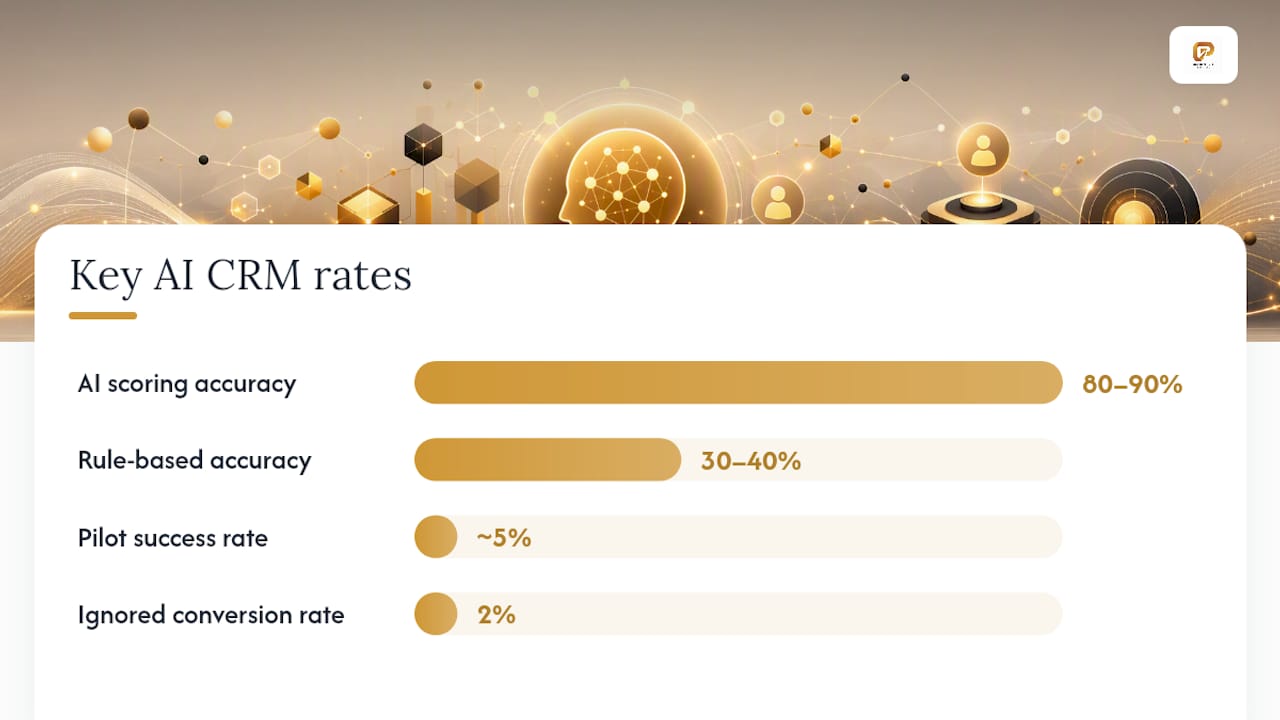
AI CRM automation delivers measurable revenue uplift and time savings when deployed on a data-ready CRM with clear workflow ownership and governance. Forrester documents cases where AI agents qualified over 12,000 monthly inbound B2B leads and converted previously ignored contacts at a 2% rate. The companies that see those results share a common trait: they fixed their data foundation before they turned on any model. Companies running on fragmented records or brittle integrations may amplify those problems, not solve them.
The short list of where to start:
- QuantaPath AI (Golden Path Digital): Best for organizations where dependency mapping, legacy system integration, or HIPAA-compliant deployment are non-negotiable requirements.
- Enterprise platforms (e.g., Salesforce, Zendesk): Best for large organizations with dedicated CRM admins, complex multi-cloud environments, and budget for deep customization.
- Mid-market automation suites (e.g., HubSpot, Zoho, Freshsales): Best for growing teams that need AI-assisted lead scoring and workflow automation without enterprise-level overhead.
- Lightweight SMB assistants (e.g., Pipedrive): Best for small sales teams that want AI-guided selling prompts and basic automation with minimal setup.
Pro Tip: *Before you evaluate any vendor, audit your CRM data completeness.
Key Takeaways
AI CRM automation delivers consistent ROI only when data readiness, workflow ownership, and governance are in place before AI features are activated.
| Point | Details |
|---|---|
| Data readiness comes first | Allocate a substantial portion of project time to data cleanup and workflow mapping before model training begins. |
| Pilot scope determines success | One workflow, one owner, one measurable KPI in 90 days is the pattern that converts pilots to production. |
| AI lead scoring accuracy | AI scoring reaches 80–90% accuracy vs. 30–40% for traditional rule-based methods, per DelveAnt. |
| Compliance is a prerequisite | HIPAA-covered workflows require a BAA, field-level encryption, and audit logs before any AI feature goes live. |
| QuantaPath AI fits complex deployments | Golden Path Digital’s QuantaPath AI leads with dependency mapping and HIPAA-capable architecture for organizations where standard platforms stall. |
Table of Contents
- How do AI CRM platforms compare across the dimensions that matter?
- How do you choose the right AI CRM automation approach?
- Which AI CRM features actually move the needle?
- Why dependency mapping and data readiness must come before AI activation
- What is an AI-powered CRM?
- How do you keep AI CRM workflows performing after go-live?
- What integration challenges should you plan for?
- Where is AI CRM technology heading?
- QuantaPath AI is built for the deployments most platforms avoid
- The data-first argument is not a delay tactic
- Sources
- FAQ
How do AI CRM platforms compare across the dimensions that matter?
Choosing an AI-driven customer management platform is less about feature lists and more about fit across eight dimensions. The table below maps four platform categories against those dimensions so your team can narrow the field before a single demo call.
| Dimension | QuantaPath AI | Enterprise Platforms | Mid-Market Suites | SMB Assistants |
|---|---|---|---|---|
| Best for | Legacy/HIPAA-sensitive orgs | Complex, multi-cloud enterprise | Growing B2B teams | Small sales teams |
| AI features | Private agents, dependency mapping, workflow automation | Lead scoring, forecasting, generative content, chatbots | Lead scoring, email automation, chatbots | AI prompts, basic scoring |
| Integrations | IBM i, Laravel, custom APIs, marketing stacks | Broad (ERP, marketing, data warehouse) | Marketing, support, light ERP | Email, calendar, basic CRM |
| Data governance & privacy | HIPAA-capable, audit logs, encryption, BAA-ready | Configurable; enterprise-grade with add-ons | Standard retention, limited masking | Minimal governance controls |
| Ease of use / admin overhead | Moderate; structured onboarding | High admin overhead | Low to moderate | Very low |
| Pricing model | License + managed service | Seat-based; high per-seat cost | Seat-based; tiered | Flat monthly per seat |
| Deployment | Cloud or hybrid | Cloud (some hybrid options) | Cloud | Cloud |
| Ideal company size | Mid-market to enterprise | Enterprise | SMB to mid-market | SMB |
Enterprise platforms: Salesforce and Zendesk
Salesforce and Zendesk sit at the top of the market for a reason: their integration surface area is enormous, and their AI layers (Einstein for Salesforce, Zendesk AI for support) are mature. The trade-off is cost and complexity. Your team will spend months on configuration, and the per-seat pricing climbs fast at scale.
- Pros: Deep ecosystem, proven AI forecasting, strong compliance tooling, large partner network.
- Cons: High total cost of ownership, long implementation timelines, admin-heavy, overkill for teams under 100 seats.
Mid-market suites: HubSpot, Zoho, and Freshsales
HubSpot, Zoho, and Freshsales target the sweet spot between capability and speed-to-value. HubSpot’s AI tools cover content generation, lead scoring, and deal forecasting. Zoho’s Zia assistant adds anomaly detection and sentiment analysis. Freshsales layers predictive contact scoring on top of a clean pipeline UI.
- Pros: Faster onboarding, lower cost, solid native integrations, good AI coverage for core sales workflows.
- Cons: Governance controls are lighter than enterprise options; data masking and audit trails often require add-ons or third-party tools.
Lightweight SMB assistants: Pipedrive
Pipedrive’s AI Sales Assistant surfaces deal-specific coaching prompts and flags stalled opportunities. It is not a forecasting engine, but for a 10-person sales team it removes the cognitive load of deciding what to work on next.
- Pros: Minimal setup, intuitive UI, affordable.
- Cons: Limited AI depth, no meaningful governance controls, not suitable for regulated industries.
Pro Tip: Ask every vendor for a data-flow diagram showing exactly where your CRM records travel during model training. If they cannot produce one in 48 hours, treat that as a governance red flag.
How do you choose the right AI CRM automation approach?
Data and workflow readiness is the single most important criterion, and every other evaluation dimension depends on it. A ScienceDirect literature review identifies data management, multi-channel integration, and tailored service delivery as the three core dimensions of AI-powered CRM capability. Your evaluation should map each vendor against those dimensions before you weigh AI feature depth.
Vendor question checklist
Take these questions to every discovery call:
- Where does our CRM data go during model training, and can we opt out of shared training pools?
- What is your data retention policy, and can records be masked or deleted on request?
- Do you provide a Business Associate Agreement (BAA) for HIPAA-covered workflows?
- What audit logs are available, and how long are they retained?
- What are your SLAs for model accuracy degradation and escalation paths when predictions fall below threshold?
- Which integration adapters are native versus requiring custom middleware?
- What is your defined path from a 90-day pilot to a production deployment?
Red flags that should stop a pilot
- No clear answer on where training data originates or whether your records are used to train shared models.
- No observability layer: if you cannot see why a lead was scored the way it was, you cannot govern the model.
- Unmanaged data retention with no deletion or masking capability.
- Integration patterns that rely on brittle point-to-point connectors with no error handling.
- A vendor who cannot describe a production path for the pilot beyond “we’ll figure it out.”
Pricing drivers
Seat-based pricing (Salesforce, HubSpot, Freshsales) is predictable but scales linearly with headcount. Usage-based pricing (API call volume, automation transaction counts) is cheaper at low volume but can spike unexpectedly during campaign peaks. Managed service contracts (QuantaPath AI, enterprise implementation partners) carry higher upfront cost but include governance, integration, and change management work that seat-based vendors leave to your team.
DestinationCRM reports that only 5% of enterprise generative AI pilots achieve meaningful revenue impact, with data quality cited as the leading obstacle.
Pro Tip: Structure your pilot around one workflow, one owner, and one measurable KPI. A pilot that tries to prove five use cases simultaneously proves none of them.
Which AI CRM features actually move the needle?
Five AI features consistently produce measurable ROI across industries: lead scoring, AI agents and chatbots, predictive forecasting, automated follow-up, and churn prediction. DelveAnt reports that A high share of companies now use AI features in their CRM, and AI lead scoring reaches 80–90% accuracy compared to 30–40% for traditional rule-based methods.
Lead scoring ranks inbound contacts by conversion probability using behavioral signals, firmographic data, and historical win patterns. Higher accuracy means your reps spend time on accounts that are actually ready to buy, which compresses cycle time.
AI agents and chatbots handle qualification, routing, and routine resolution at scale. Forrester’s documented case of Siemens qualified thousands of monthly B2B inbound leads with AI agents, with some conversion from previously ignored contacts, illustrates what happens when agents are deployed on clean, structured data.
Predictive forecasting replaces gut-feel pipeline reviews with probability-weighted deal scores. The practical outcome is fewer end-of-quarter surprises and better resource allocation across the sales team.
Automated follow-up removes the manual burden of sequencing outreach. Industry data cites typical time savings of 12 hours per rep per week when follow-up and data entry are automated.
Churn prediction flags at-risk accounts before they cancel, giving customer success teams a defined intervention window.
| AI Feature | Typical Outcome | Source |
|---|---|---|
| Lead scoring accuracy | 80–90% vs. 30–40% traditional | DelveAnt |
| Rep time saved via automation | ~12 hours per rep per week | DelveAnt |
| Enterprise AI pilot success rate | ~5% reach meaningful revenue impact | DestinationCRM |
| B2B lead qualification at scale | 12,000+ leads/month; 2% conversion from ignored leads | Forrester |
Two patterns show up in successful deployments. First, teams that sequenced data cleanup before agent activation saw agents perform as designed. Second, teams that skipped that step found agents confidently scoring bad data and routing leads to the wrong reps. The AI did not fail; it did exactly what it was trained to do on flawed inputs.
An MDPI study on AI chatbots in CRM confirms efficiency and satisfaction gains across industries but emphasizes that healthcare and other regulated sectors require explicit governance and auditing before deployment. That caveat applies to any AI feature touching protected health information, not just chatbots.
Why dependency mapping and data readiness must come before AI activation
Fix the foundation first. AI amplifies whatever is already in your CRM: clean, structured data produces accurate predictions; fragmented, duplicate-heavy records produce confident wrong answers. Vantage Point’s analysis puts roughly 70% of CRM implementations in the fail-or-underperform category, with foundation gaps as the primary cause.
Implementation checklist before you activate AI
- Data audit: Identify duplicate records, missing fields, and inconsistent naming conventions across all CRM objects.
- Canonical record strategy: Define a single source of truth for accounts, contacts, and opportunities, and enforce it with validation rules before AI training begins.
- Workflow mapping: Document the exact steps a lead or case follows from entry to resolution. AI cannot automate a workflow your team has not agreed on.
- Integration stability tests: Confirm that data flows between your CRM, marketing automation, and support tools are reliable and error-logged before adding AI layers.
- Governance roles: Assign a named owner for each AI workflow who is accountable for monitoring accuracy and escalating anomalies.
- Observability and monitoring: Deploy logging that captures model inputs, outputs, and confidence scores so you can audit decisions and detect drift.
For U.S. organizations handling protected health information, HIPAA-compliant CRM deployment requires a signed BAA with your CRM vendor, field-level encryption for PHI, and audit logs retained per your covered entity’s policy. These are not optional enhancements; they are legal requirements that must be scoped before any AI feature touches patient or member data.
That ratio feels uncomfortable when stakeholders want to see AI in action quickly, but it is the difference between a pilot that converts to production and one that gets quietly shelved.
Pro Tip: Capture structured user feedback (thumbs up/down on AI suggestions, correction logs) from day one of your pilot. That signal is your early warning system for model drift and the fastest path to improving accuracy without retraining from scratch.
What is an AI-powered CRM?
An AI-powered CRM is a customer relationship management system that uses machine learning, natural language processing, and predictive analytics to automate decisions and actions that previously required manual effort. Where a traditional CRM stores and retrieves data, an AI-powered CRM acts on it: scoring leads, predicting deal outcomes, routing support cases, and generating follow-up content without waiting for a rep to log in.
The distinction matters for buyers because it shifts the system’s role from a record-keeping tool to an active participant in revenue workflows. Platforms like Salesforce (Einstein), HubSpot (Breeze AI), Zoho (Zia), Freshsales (Freddy AI), Pipedrive (AI Sales Assistant), and Zendesk AI each embed this capability differently, with varying depth in forecasting, agent autonomy, and governance controls. QuantaPath AI from Golden Path Digital extends this model into environments where legacy system integration and compliance-grade deployment are prerequisites, not afterthoughts.
How do you keep AI CRM workflows performing after go-live?
The go-live date is not the finish line; it is the start of a different kind of work. Most AI CRM performance problems that surface in months three through six trace back to two causes: users reverting to manual workarounds because they do not trust the AI’s suggestions, and model accuracy drifting as the underlying data changes.
Address user trust first. Train your team on why the AI scores or routes the way it does, not just how to use the interface. When reps understand that a low lead score reflects missing firmographic data rather than a vendor black box, they are more likely to correct the record than ignore the score. Role-specific training sessions, short video walkthroughs, and a clear escalation path for disagreeing with an AI recommendation all reduce workaround behavior.
On the technical side, schedule a monthly accuracy review for each AI workflow. Compare model predictions against actual outcomes (did the high-scored leads close? did the flagged churn accounts actually churn?) and use that delta to identify retraining triggers. Pair that review with your structured user feedback logs from the pilot phase. For teams evaluating workflow automation tools alongside CRM AI, the same governance rhythm applies: measure, adjust, and document changes so your audit trail stays current.
What integration challenges should you plan for?
The most common integration failure in AI CRM projects is not a technical one. It is a data-contract problem: two systems that both claim to own the “account” record, with no agreed rule for which one wins when they conflict. Before you connect your CRM to a marketing automation platform, a data warehouse, or a support tool, define the canonical record and the direction of truth for every shared object.
Technically, watch for three patterns that create fragility:
- Point-to-point API connectors with no retry logic or error alerting. A single failed sync can corrupt lead scores for an entire day before anyone notices.
- Batch sync schedules that are too infrequent for real-time AI features. If your lead scoring model runs on data that is 24 hours stale, your reps are working from yesterday’s picture.
- Schema drift: when a source system adds or renames a field, downstream AI models trained on the old schema silently degrade. Build schema change alerts into your integration monitoring.
For organizations running IBM i or legacy ERP systems alongside a modern CRM, the integration surface is wider and the schema drift risk is higher. Golden Path Digital’s private AI deployment patterns address this by mapping dependencies before connecting systems, which is the same logic that applies to any legacy-to-CRM integration project.
Where is AI CRM technology heading?
Three trends are reshaping the category over the next 12–24 months.
Agentic AI is moving from single-task automation to multi-step autonomous workflows. Instead of scoring a lead and stopping, an agent will score the lead, draft a personalized outreach sequence, schedule the first touch, and update the opportunity record, all without human input at each step. Forrester’s current reporting on AI agents in CRM frames this as the next major productivity unlock for sales and service teams.
Private and on-premise AI deployment is gaining ground in regulated industries. Healthcare, financial services, and government buyers are pushing vendors for deployment options that keep training data within their own infrastructure. This is not a niche requirement; it is becoming a procurement standard in those sectors.
Real-time personalization at scale is the third shift. As AI models get faster and cheaper to run, the gap between “personalized for a segment” and “personalized for this individual contact at this moment” is closing. CRMs that can act on behavioral signals within seconds of a customer interaction, rather than batching overnight, will define the next generation of customer experience benchmarks.
QuantaPath AI is built for the deployments most platforms avoid
Most AI CRM platforms assume you are starting with clean, cloud-native data. QuantaPath AI from Golden Path Digital is built for the organizations that are not. When your customer data lives in IBM i systems, legacy ERPs, or a CRM that has never been properly governed, the standard vendor playbook breaks down before the pilot even starts.

QuantaPath AI leads with dependency mapping: before any AI agent touches your workflows, Golden Path Digital maps the data relationships, integration points, and compliance requirements that will determine whether the deployment succeeds or stalls. For healthcare and other regulated organizations, that includes HIPAA-compliant architecture with BAA coverage, field-level encryption, and audit logging built in from day one, not bolted on later.
The typical buyer is a CTO or VP of Operations at a mid-market or enterprise organization that has already tried a standard CRM AI rollout and hit a wall at the integration or compliance stage. If that describes your situation, the right next step is a technical discovery call with Golden Path Digital’s team. Visit Goldenpathdigital to request a readiness assessment and get a clear picture of what your pilot scope should look like before you commit to a vendor.
The data-first argument is not a delay tactic
The most common objection I hear to the data-readiness-first approach is that it slows things down. Stakeholders want to see AI working, and a six-week data audit feels like a detour. It is not. It is the only path that does not end in a quietly shelved pilot.
The evidence is consistent: organizations that treat AI activation as a technology problem, rather than a data and workflow problem, hit the same wall at the same point in the project. It is a sequencing failure.
My recommendation is to be ambitious about the use cases you want to reach, and conservative about the order in which you pursue them. Pick one workflow where the data is cleanest, assign a single owner, define a KPI you can measure in 90 days, and build from there. That is not a small ambition. That is how you get to production.
If your team is ready to scope that pilot, Golden Path Digital’s readiness assessment is a practical starting point.
Sources
- Why AI Fails When Your CRM Foundation Is Broken | Vantage Point
- Economic and managerial implications of AI-powered chatbots within CRM systems
FAQ
What is AI CRM automation?
AI CRM automation uses machine learning and predictive analytics to handle tasks like lead scoring, follow-up sequencing, deal forecasting, and support routing without manual input at each step. It shifts the CRM from a record-keeping system to an active participant in revenue workflows.
Which AI CRM platform is best for regulated industries?
For organizations with HIPAA or other compliance requirements, platforms that offer BAA coverage, field-level encryption, and audit logging are necessary. QuantaPath AI from Golden Path Digital is built specifically for these environments, including legacy system integration.
Why do most AI CRM pilots fail?
DestinationCRM reports that only 5% of enterprise generative AI pilots reach meaningful revenue impact, with data quality and lack of a production path as the leading causes.
How accurate is AI lead scoring compared to traditional methods?
That gap translates directly to rep time spent on accounts that are actually ready to buy.
How long does an AI CRM pilot typically take?
A well-scoped pilot covering one workflow with one owner and one measurable KPI typically runs around 90 days. That timeline assumes data readiness work is completed before the pilot starts, not during it.