

The safest path to a Laravel 11 upgrade is: upgrade PHP to 8.2 or higher, run composer why-not laravel/framework 11.0 to map every incompatible dependency, bump first-party packages to their required major versions, execute a staged composer update --with-all-dependencies, run your full test suite, then deploy through a canary or blue/green strategy with a pinned rollback artifact ready.
Before you write a single line of code, do these three things:
- Run
composer why-not laravel/framework 11.0and document every blocked package. - Confirm your server or container runs PHP 8.2 or higher.
- Take a full DB snapshot, lock your
composer.lock, and spin up a staging environment that mirrors production.
Time estimate: A small app with few third-party packages typically takes 2–4 hours. A medium-complexity app with custom middleware and several first-party packages runs 1–3 days. A large enterprise app with legacy service providers, custom authentication flows, and deep queue workers should budget 1–3 weeks, including contingency time for package blockers.
Key Takeaways
A successful Laravel 11 upgrade requires PHP 8.2, a dependency-first Composer audit, explicit first-party package bumps, and a staged deployment with a tested rollback artifact in place before you promote to production.
| Point | Details |
|---|---|
| PHP 8.2 is mandatory | Laravel 11 will not run on PHP 8.1; confirm version parity across local, CI, and production. |
| Run composer why-not first | composer why-not laravel/framework 11.0 is the golden gate; resolve every blocker before bumping the framework. |
| Bump first-party packages explicitly | Sanctum ^4.0, Passport ^12.0, Telescope ^5.0, Breeze ^2.0, and Cashier ^15.0 must be updated in composer.json. |
| Staged deploy with rollback artifact | Deploy stage → canary → full; keep the previous tagged artifact deployable and a DB snapshot ready. |
| Golden Path Digital’s Laravel Ascend | Automates dependency analysis and atomic upgrade commits for large or complex codebases, reducing manual effort. |
Table of Contents
- What breaking changes in Laravel 11 should you scan for first?
- Pre-upgrade checklist: environment, backups, and CI gating
- How do you find and resolve incompatible Composer packages?
- Step-by-step upgrade commands and what to search-replace
- How should you test, deploy, and roll back a Laravel 11 upgrade?
- Post-upgrade housekeeping: cleanup, deprecations, and release tagging
- Enterprise strategy: realistic timelines and version-by-version planning
- What the dependency-first approach actually looks like in practice
- Laravel Ascend handles the upgrade work your team shouldn’t do manually
- Sources
- FAQ
What breaking changes in Laravel 11 should you scan for first?
Laravel 11 introduced several high-impact changes that can silently break production behavior if you don’t know where to look. The most consequential ones are not always the loudest.
Mandatory behavioral changes (every app):
- PHP 8.2 minimum. No negotiation. PHP 8.1 will not run Laravel 11.
- Per-second rate limiting. The
throttlemiddleware now supports per-second limits. If your app relies on per-minute assumptions in custom rate-limit logic, verify the behavior. - Health routing. A
/uphealth endpoint is registered by default. If you have a conflicting route, it will be overridden. - APP_PREVIOUS_KEYS for encryption key rotation. You can now specify previous keys so decryption falls back gracefully during a rotation cycle, rather than invalidating all encrypted payloads immediately.
- Resend mail transport. A new first-party driver; no action needed unless you were using a community package for the same purpose.
- Prompt validator integration. Laravel’s
Validatornow integrates with the Prompts library for CLI workflows.
Structural changes (optional for existing apps):
The new minimal app skeleton consolidates app/Http/Kernel.php, app/Console/Kernel.php, and the EventServiceProvider into bootstrap/app.php. Middleware and event listeners are now registered there. For existing apps, this refactor is entirely optional. Migrating to the new skeleton during an upgrade adds risk without adding functionality. Defer it.
Pro Tip: Prioritize auditing code paths that touch middleware registration, exception handling, and custom service providers. Those three areas account for the majority of upgrade-related regressions. The 11.x changelog gives you the precise, patch-level behavioral diffs to cross-reference against your own codebase.
Pre-upgrade checklist: environment, backups, and CI gating
Getting the environment right before you touch composer.json is what separates a controlled upgrade from a fire drill.
Runtime requirements
- PHP 8.2 or higher with the following extensions:
BCMath,Ctype,cURL,DOM,Fileinfo,JSON,Mbstring,OpenSSL,PCRE,PDO,Tokenizer,XML. Confirm all are present in your staging container. - Composer 2.x. Composer 1.x is not supported and will produce unreliable dependency resolution.
- Verify PHP version parity between your local environment, CI runner, and production server before proceeding.
Artifacts to lock before you start
- Commit and tag your current
composer.lockas a rollback artifact. - Copy
.envto.env.backupand store it outside the repo. - Take a full database snapshot with a timestamp label (e.g.,
pre-laravel11-upgrade-YYYYMMDD). - If you use Docker, tag and push your current production image before making any changes.
- Archive the
storage/directory if it contains user-generated content that migrations might touch.
CI gating and staging
Your CI pipeline should enforce a green test suite before any release candidate is cut. Production-grade smoke tests and a passing test suite are the minimum gate before you promote an upgrade build. If your test coverage is thin, add smoke tests for your three most critical user flows now, before the upgrade, not after.
Pro Tip: Run your existing test suite against PHP 8.2 on a separate branch before touching Laravel at all. This isolates PHP-level deprecations from framework-level breaks, giving you a cleaner signal on what actually needs fixing.
How do you find and resolve incompatible Composer packages?
Composer compatibility is the primary failure point in any Laravel 11 upgrade. The official upgrade guide is explicit: run composer why-not laravel/framework 11.0 before anything else.
Commands to run first
composer why-not laravel/framework 11.0
composer outdated --direct
composer why-not tells you exactly which installed packages have version constraints that block Laravel 11. composer outdated --direct surfaces packages with available updates that you may need to bump anyway. Work through the why-not output first; it is your prioritized fix list.
First-party packages that need explicit major bumps
These packages will block the upgrade if left at their Laravel 10 versions:
laravel/sanctum→^4.0laravel/passport→^12.0laravel/telescope→^5.0laravel/breeze→^2.0laravel/cashier→^15.0
Update each one explicitly in composer.json before running the full composer update.
Handling blocked third-party packages
When a third-party package has no Laravel 11-compatible release, you have four options, roughly in order of preference:
- Update the constraint if a compatible version exists but your
composer.jsonpins an older range. - Check the upstream repo for an open PR or a tagged pre-release that supports Laravel 11.
- Wrap it behind an adapter layer so the incompatible package is isolated from the rest of your app while you wait for upstream support.
- Replace it with a maintained alternative if the package is abandoned.
Pro Tip: Update your test and dev tooling first. Bump Pest to ^3.0 or PHPUnit to ^11.0 before touching production dependencies. Catching test-runner incompatibilities early means your test suite stays green as a reliable signal throughout the rest of the upgrade.
Step-by-step upgrade commands and what to search-replace
With your environment aligned and your dependency blockers mapped, the actual upgrade follows a predictable sequence.
Ordered upgrade checklist
- Pin the new framework version without resolving yet:
composer require "laravel/framework:^11.0" --no-update - Update first-party packages in
composer.jsonto their required major versions (Sanctum, Passport, Telescope, Breeze, Cashier as listed above). - Resolve all dependencies in one pass:
composer update --with-all-dependencies - Run automated fix tooling if you are using Rector or a similar static-analysis tool configured for Laravel 11 migrations.
- Run your full test suite. Do not proceed until it passes.
- Deploy to staging and run smoke tests against the live environment.
- Promote to production via your canary or blue/green strategy.
Code areas to search and replace
AppHttpKernelreferences: if you are adopting the new skeleton, middleware registration moves tobootstrap/app.php. For existing apps keeping the old structure, verify no package expects the new location.AppConsoleKernelreferences: same consideration.EventServiceProviderduplicate registrations: automated tools sometimes generate duplicate listener registrations when both the old provider and the newbootstrap/app.phpapproach are partially in place. Search for duplicatedSendEmailVerificationNotificationlistener entries.- Exception handler customizations: the
Handler.phpapproach still works, but verify your customrender()andreport()methods behave correctly under the new exception rendering pipeline.
When to use an automated tool versus a manual approach depends on codebase size and internal capacity. For apps with dozens of service providers, custom middleware stacks, and years of accumulated customizations, automated upgrade tooling reduces the repetitive search-and-replace burden significantly. For a small app with clean architecture, a manual pass through the official checklist is often faster. Automated tools always require human review for app-specific customizations, particularly around duplicated event registrations.
How should you test, deploy, and roll back a Laravel 11 upgrade?
Testing and deployment strategy determine whether your upgrade is a scheduled event or an unplanned incident. Minor patch releases can alter queue internals and exception rendering, so the same discipline that applies to major upgrades applies to every production promotion.
Testing gates to enforce
- Unit tests: verify individual class behavior has not regressed.
- Feature tests: cover HTTP endpoints, authentication flows, and queue dispatch.
- Integration tests: validate database interactions, cache behavior, and external service calls.
- Acceptance/smoke tests: run against the staging URL after deployment, not just locally.
Monitor p95 latency, 5xx error rate, and queue retry rate as your three primary telemetry signals during and after rollout.
Deployment strategy
The recommended sequence is stage → canary → full rollout. Deploy to staging first and let it run under synthetic load for at least 30 minutes. Watch for elevated 5xx rates or queue retry spikes before cutting over fully. Blue/green and rolling deployments both work; the key is that your previous artifact tag remains deployable without any additional steps.
Rollback playbook
If telemetry degrades after promotion:
- Re-deploy the previous tagged artifact immediately. Do not wait to diagnose in production.
- If database migrations ran, restore from the pre-upgrade snapshot taken before you started.
- Clear application caches and session stores:
php artisan cache:clear,php artisan config:clear,php artisan route:clear. - Verify the rollback by running your smoke test suite against the restored environment.
- Document the failure mode before attempting the upgrade again.
Pro Tip: Capture your pre-upgrade synthetic check envelopes (expected response bodies, status codes, and latency baselines) and store them alongside your rollback artifact. After a rollback, re-run those checks to confirm the environment is genuinely back to baseline, not just “not throwing 500s.”
Post-upgrade housekeeping: cleanup, deprecations, and release tagging
A completed upgrade that leaves compatibility shims, elevated log levels, and undocumented changes in the repo is a future incident waiting to happen.
Immediate cleanup tasks:
- Remove any temporary
@deprecatedsuppression annotations or compatibility shims you added during the upgrade. - Revert any debug-level logging changes made to diagnose upgrade issues.
- If you kept the old
Kernel.phpfiles as a compatibility bridge, decide now whether to remove them or document their retention explicitly. - Re-enable any middleware you temporarily disabled for testing.
Deprecation sweep:
Search your codebase for methods and patterns flagged as deprecated in Laravel 10 that are removed or changed in Laravel 11. Common targets include older Route:: macro patterns, deprecated Str:: and Arr:: methods, and any direct references to IlluminateFoundationHttpKernel that assume the old registration model. The 11.x changelog is the authoritative reference for removed method signatures.
Release tagging and documentation:
- Tag a release in your version control system immediately after a successful production promotion (e.g.,
v2.x.0-laravel11). - Add a changelog entry that records the Laravel version bump, PHP version requirement, and any first-party package major bumps.
- Update your deployment runbook to reflect the new PHP version requirement so the next engineer doesn’t spend an hour debugging a PHP 8.1 container.
Enterprise strategy: realistic timelines and version-by-version planning
The official documentation suggests an upgrade can take around 15 minutes. That estimate is optimistic for complex enterprise applications, and treating it as a planning baseline is how teams end up in a two-week incident.
Version-by-version is the safer path
If your app is on Laravel 9, upgrade to 10 first, stabilize, then upgrade to 11. Skipping a major version compounds the number of breaking changes your team must resolve simultaneously and makes it harder to isolate which change caused a regression. The Laravel 9 to 10 path is well-documented and the dependency ecosystem is stable; use it as a stepping stone.
Timeline estimates by complexity
- Small app (fewer than 5 third-party packages, minimal customization): 2–4 hours, one engineer.
- Medium app (10–20 packages, custom middleware, standard first-party packages): 1–3 days, one senior developer with a reviewer.
- Large/enterprise app (50+ packages, custom authentication, payment flows, long-running workers, multiple service providers): 1–3 weeks, a dedicated upgrade owner plus a reviewer, with a formal runbook and a staged rollout plan.
When to allocate engineering time vs. when to use automation
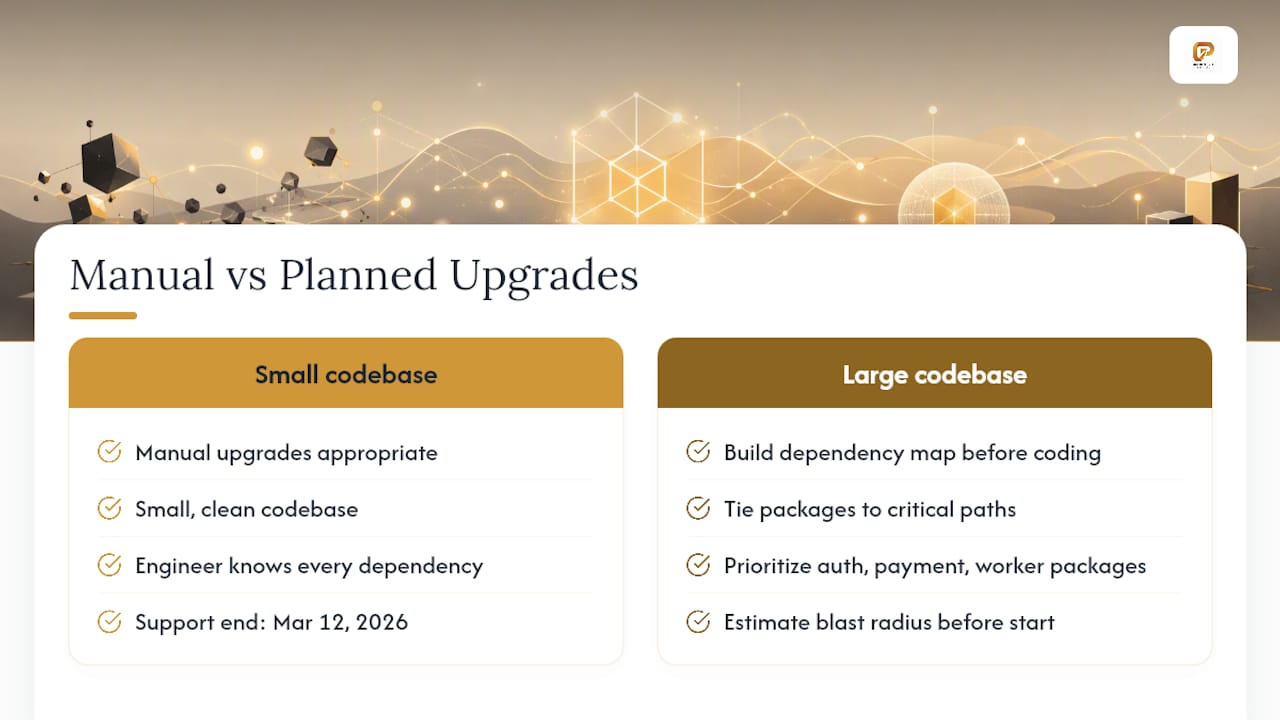
Manual upgrades make sense for small, clean codebases where the engineer knows every dependency. For large codebases, the calculus shifts. Building a dependency map that ties packages to critical paths before writing any code is the single highest-leverage planning step for enterprise teams. It lets you prioritize fixes for packages that touch authentication, payment flows, and long-running workers, and it gives you a clear blast radius estimate before you start.
Pro Tip: Assign a single runbook owner for the upgrade. That person is responsible for the dependency map, the rollback artifact, and the go/no-go decision at each deployment gate. Distributed ownership of an upgrade is one of the most reliable ways to miss a critical step.
Laravel’s support timeline is also a planning input: security fix support for Laravel 11 ended March 12, 2026, so teams still on Laravel 10 or earlier should factor version 12 into their roadmap alongside this upgrade.
What the dependency-first approach actually looks like in practice
Most upgrade guides treat composer why-not as a diagnostic step. Golden Path Digital treats it as the foundation of the entire upgrade plan. Before any code changes, the team builds a full dependency map that ties every blocked package to the application features it supports. That map determines the upgrade sequence, the test coverage gaps to close first, and the rollback trigger conditions.
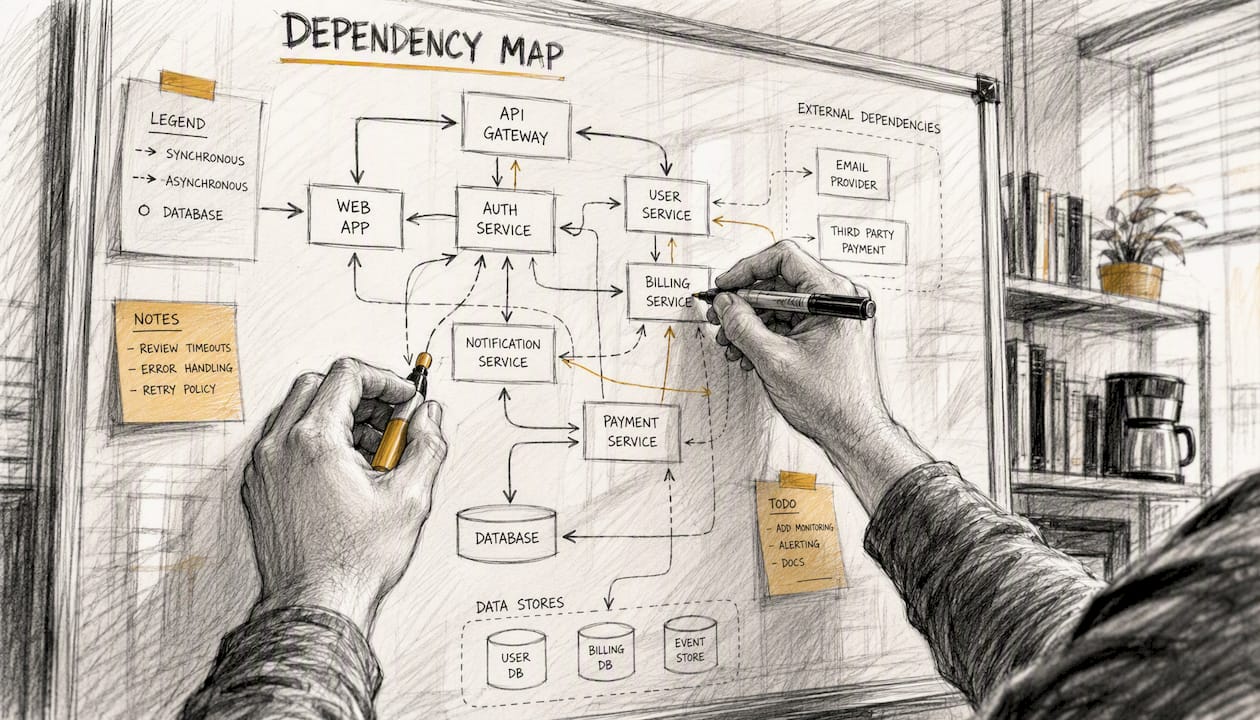
The practical difference shows up in enterprise engagements. When a package blocking Laravel 11 also sits in the authentication critical path, that is not a routine constraint bump. It is a risk item that needs its own staging validation window and a dedicated rollback test. Without the map, teams discover this at 11 PM on a Friday.
Golden Path Digital’s Laravel Ascend automates the dependency analysis, generates atomic upgrade commits for review, and produces rollback artifacts as part of the process. For teams managing large upgrade waves across multiple applications, the automation handles the repetitive work on a schedule instead of on a prayer.
Laravel Ascend handles the upgrade work your team shouldn’t do manually
Upgrading a single clean app manually is a reasonable afternoon. Upgrading a portfolio of Laravel applications, or a single large app with years of accumulated customization, is a different problem entirely.

Laravel Ascend is Golden Path Digital’s automated upgrade tool, built specifically for teams that need to move from Laravel 6 through 11 without burning weeks of senior developer time on search-and-replace work. It runs dependency analysis, generates atomic commits organized for human review, and produces pinned rollback artifacts at each stage. For teams with tight release windows or limited internal capacity, it compresses the upgrade timeline while keeping your engineers in control of the review and promotion decisions. To see how it fits your specific codebase, contact Golden Path Digital for an assessment.
Sources
- Today, we’re thrilled to announce the release of Laravel 11 and Laravel Reverb.
- Release Notes for 11.x
- Laravel 11: key changes, support status, and upgrade advice
- Laravel 11 Migration Guide: Complete | JetThoughts Blog
FAQ
What PHP version does Laravel 11 require?
Laravel 11 requires PHP 8.2 or higher. PHP 8.1 is not supported, so confirm your server, CI runner, and local environment all run 8.2 before starting the upgrade.
Do you have to migrate to the new Laravel 11 app skeleton?
No. Existing apps can keep the Laravel 10 folder structure. The new minimal skeleton is optional, and migrating to it during an upgrade adds unnecessary risk. Defer that refactor until after the dependency upgrade is stable.
How long does a Laravel 10 to 11 upgrade take?
The official “15 minutes” estimate applies only to the simplest, cleanest codebases.
What is the first command to run when upgrading to Laravel 11?
Run composer why-not laravel/framework 11.0 before touching anything else. It identifies every package blocking the upgrade and gives you a prioritized fix list.
When should you use an automated upgrade tool instead of upgrading manually?
Automation makes the most sense for large codebases, teams with limited internal capacity, or organizations managing multiple Laravel applications at once. Golden Path Digital’s Laravel Ascend handles dependency analysis and generates atomic commits for review, reducing the manual workload while keeping your team in control of promotion decisions.