

To upgrade an app to Laravel 6, you must run PHP 7.2 or higher, update composer to require laravel/framework on ^6.0, confirm your third-party packages support that constraint, and test the whole thing on a feature branch before touching anything else. Skip any of those three, and you’re upgrading blind.
Laravel 6 was the first release to adopt semantic versioning, which means the jump from 5.8 is more disciplined than earlier major upgrades, but it still breaks things. Helpers moved into a separate package. Carbon jumped to 2.0. The default Redis client switched. None of these are catastrophic on their own, but stacked together on a codebase you haven’t touched in two years, they add up fast.
Here’s what to do in the first hour:
- Branch it. Create a dedicated feature branch. Don’t upgrade on
main. - Match your runtime. Confirm PHP 7.2+ locally and in CI before you edit
composer.json. - Isolate the update. Run
composer updatein a throwaway environment first, not your working machine’s primary install.
Pro Tip: Run composer outdated before you touch anything. It tells you which packages are already behind, which saves you from discovering a stale dependency mid-upgrade instead of before it.
A small app with few third-party packages can realistically upgrade in a day. A medium app with custom auth, queues, and a handful of packages built for Laravel 5.x usually takes two to four days. Large, enterprise codebases with heavy helper usage, custom Redis queues, or deep Eloquent customization can stretch into weeks. The biggest blockers are almost always the same three: removed helper functions, laravel/ui extraction for frontend scaffolding, and Carbon 1.x compatibility.
Key Takeaways
Upgrading to Laravel 6 succeeds when you fix your PHP runtime first, map dependencies before editing composer.json, and test the extracted helpers, Carbon 2.0, and Redis client changes before deploying.
| Point | Details |
|---|---|
| Confirm PHP 7.2+ everywhere | Update local, CI, and staging environments to PHP 7.2 or higher before editing composer.json. |
| Map dependencies before transforming code | Build a compatibility matrix for third-party packages to avoid mid-upgrade composer conflicts. |
| Fix helpers in two phases | Add laravel/helpers as a stopgap, then refactor to Str:: and Arr:: before removing it. |
| Test the high-risk areas specifically | Add smoke tests for authentication, email verification, and queue processing, not just your general suite. |
| Automate large or complex upgrades | Golden Path Digital’s Laravel Ascend maps dependencies before applying code transforms, reducing regression risk on enterprise codebases. |
Table of Contents
- Upgrade Laravel 6: Pre-Upgrade Checklist for Environment and Dependencies
- Upgrading Your Laravel Application to Version 6: Commands and Order of Operations
- What Breaking Changes Should You Watch for After Upgrading?
- How Do You Test a Laravel 6 Upgrade Before Deploying?
- Should You Automate Your Laravel 6 Upgrade or Do It Manually?
- What’s the Rollback Plan if Your Laravel 6 Upgrade Fails?
- Why Dependency Mapping Beats Guesswork on Every Upgrade
- Get Help Upgrading Laravel 6 the Structured Way
- Sources
- FAQ
Upgrade Laravel 6: Pre-Upgrade Checklist for Environment and Dependencies
Before you write a single line of migration code, you need to know exactly what you’re standing on. Skipping this step is how a routine dependency bump turns into a three-day fire drill.
Start by confirming your current stack:
-
Run
php -vto check your active PHP version, then confirm it againstcomposer show laravel/frameworkto see your current Laravel version. -
Check installed PHP extensions with
php -magainst Laravel 6’s requirements (BCMath, Ctype, JSON, Mbstring, OpenSSL, PDO, Tokenizer, and XML are typically mandatory). -
Run
composer why laravel/frameworkandcomposer outdatedto see which packages depend on your current version and which are already stale. -
Build a simple compatibility matrix: list every third-party package, its current version, and whether its changelog mentions Laravel 6 support.
-
Snapshot your database and back up your
.envand storage assets before you touchcomposer.json.
Repository hygiene matters more here than in a typical feature branch. Tag your current production commit so you have an instant rollback point, and if your app has a staging environment, mirror it before you start. Golden Path Digital has seen teams skip the database snapshot step because “the migration is reversible,” only to discover a third-party package silently altered a column type during composer update.
A ten-minute backup avoids a very bad afternoon.
Effort estimation should follow app size, not gut feeling. A small app (under 50 routes, minimal package dependencies) is a same-day job. A medium app with custom middleware, queued jobs, and API authentication through Passport or Sanctum needs a scheduled maintenance window, not a Friday-afternoon push. Large applications, especially ones running scheduled jobs or handling live transactions, deserve a dedicated hotfix window with a rollback plan already written down, not improvised at 2 a.m.
Finally, get your CI pipeline running PHP 7.2 in parallel with your existing version before you merge anything. If your continuous integration setup still tests against PHP 7.1, your green checkmarks are lying to you.
Pro Tip: Add a temporary CI job that runs your test suite against both your old PHP version and 7.2 side by side. When the 7.2 job goes green, you know your suite (not just your intuition) is calling the upgrade safe.
Upgrading Your Laravel Application to Version 6: Commands and Order of Operations
This is the part where you actually touch code. Follow the order below. Skipping steps or running them out of sequence is the single most common reason developers report a “simple upgrade” spiraling into a multi-day debugging session.
1. Upgrade your runtime everywhere it runs.
Move local development and CI to PHP 7.2 or higher before you edit a single dependency. If you’re jumping from an older Laravel version and skipped several majors, this step gets bigger. Practitioner reporting on modern Laravel adoption confirms that multi-major jumps almost always require synchronizing the PHP runtime alongside the framework, not after it.
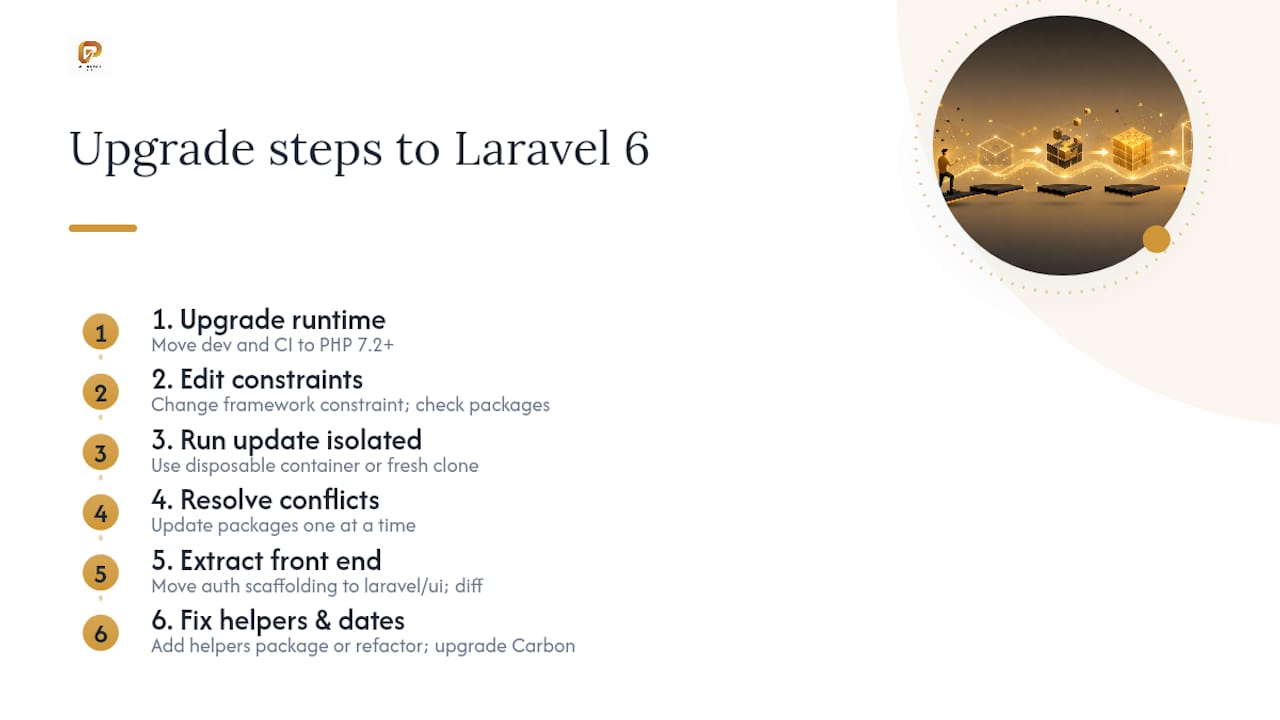
2. Edit composer.json deliberately, not blindly.
Change your framework constraint to:
"laravel/framework": "^6.0"
Then check first-party packages you’re using. If your app uses OAuth through Passport, confirm the version supports Laravel 6 before updating. Same for Cashier, Horizon, or Scout if they’re in your stack. Don’t just bump every version number to * and hope composer sorts it out. It won’t.
3. Run the update in isolation.
composer update
Run this in a disposable Docker container or a fresh local clone, never directly on your primary working copy. If it fails, you want a clean environment to diagnose from, not a half-upgraded mess you have to git checkout your way out of.
4. Resolve version conflicts incrementally.
If composer throws a conflict, don’t try to force every package to its latest version at once. Update one package at a time, starting with the ones flagged in your compatibility matrix from the checklist step, and re-run composer update <package> narrowly. If a package genuinely has no Laravel 6 release yet, a temporary laravel/helpers requirement can buy you time while you wait or fork.
5. Extract frontend scaffolding if you’re using Laravel’s built-in auth views.
Laravel 6 pulled make:auth and related scaffolding out of core and into the standalone laravel/ui package. If your app relies on the default login, registration, or password reset views:
composer require laravel/ui
php artisan ui vue --auth
Then diff the generated views against your customized ones before overwriting anything. Teams that skip this diff step routinely lose custom branding or validation logic buried in the old auth views.
6. Fix removed helper calls.
Laravel 6 extracted many global helpers like str_slug(), array_get(), and their siblings out of the core framework. You have two real options: install laravel/helpers as a stopgap, or refactor calls to use IlluminateSupportStr:: and IlluminateSupportArr:: directly. The two-phase approach works best for larger codebases: add the helpers package first to get the app running on 6.x, then run automated find-and-replace passes to migrate to Str:: and Arr:: before removing the compatibility package in a later cleanup.
7. Upgrade Carbon and audit date logic.
Carbon jumped to 2.0 in this release. Most date formatting and comparison methods behave the same, but some deprecated method signatures changed. Search your codebase for custom Carbon macros or subclassing, since those are the spots most likely to break silently.
8. Check your Redis client.
Laravel 6 changed its default queue and cache Redis client from predis to phpredis. If your .env or config/database.php assumes predis, either install the phpredis PHP extension or explicitly set the client back:
'client' => 'predis',
in your Redis config array.
9. Clear and rebuild caches, then run migrations.
php artisan config:clear
php artisan route:clear
php artisan config:cache
php artisan route:cache
php artisan migrate
Run these in this order. Cached config from your old version can mask errors that only surface once you clear it.
10. Run your test suite and fix what breaks.
Don’t just eyeball the diff. Run the full suite, note every failure, and fix them one at a time rather than in a batch commit.
Pro Tip: Run PHPStan against your codebase before and after the composer update. It catches deprecated helper calls and type mismatches that your test suite might not exercise directly, especially in rarely-tested admin or reporting code.
What Breaking Changes Should You Watch for After Upgrading?
Most Laravel 6 upgrade failures trace back to a short, predictable list. Golden Path Digital’s engineering teams see the same five or six issues repeatedly across client migrations, and knowing them ahead of time turns a debugging session into a checklist.
- Global helpers. Search your codebase for
str_,array_, and similar prefixed function calls. Each one either needslaravel/helpersinstalled or a rewrite toStr::orArr::. Example:str_slug($title)becomesStr::slug($title). - Email verification routes. If your app uses
MustVerifyEmail, the verification route signature changed. Check that your route file still matches the expectedverification.notice,verification.verify, andverification.resendnames, since custom route overrides written for 5.8 can silently 404. - Authorization policies. If you use
authorizeResource()in a controller, Laravel 6 now requires aviewAnymethod on your policy class, not justview. Missing it throws an authorization exception on index routes that worked fine before. - Response constructor signature. If you extend or manually instantiate
IlluminateHttpResponse, double-check constructor argument order against the new signature before you deploy. - Queue
--triesbehavior. The default retry behavior for failed queue workers changed. If your jobs relied on the old default, set--triesexplicitly in your supervisor or systemd config rather than assuming the old behavior still applies. - BelongsTo::update quirks. Calling
update()directly through aBelongsTorelationship can behave differently than calling it on the resolved model instance. If you see unexpected attribute overwrites, switch to$model->relation()->getResults()->update()or fetch the model first. - LazyCollection and cursor() memory profile. Laravel 6 introduced
LazyCollection, andcursor()now returns one. This is a genuine improvement for memory usage on large datasets, but it changes how you can chain collection methods. Test any code that iterates large query results.
Laravel’s own documentation flags each of these with explicit “likelihood of impact” labels rather than treating every change as equally risky, which is exactly the kind of triage information that turns a vague “test everything” instruction into an actual prioritized checklist.
The pattern across all of these: nothing here is a redesign. Every fix is small and mechanical, but there are enough of them that skipping the search-and-replace step in favor of “just running it and seeing what breaks” tends to cost more time than doing the audit up front.
How Do You Test a Laravel 6 Upgrade Before Deploying?
Testing an upgrade well is different from testing a feature. You’re not verifying new behavior, you’re proving old behavior survived, which means your test priorities shift toward the parts of the app people never bother testing because they “just work.”
- Run your existing full test suite first, and treat any failure as an upgrade issue until proven otherwise, not a pre-existing bug.
- Add smoke tests specifically for authentication, email verification, and queue job dispatch if you don’t already have them. These three areas break most often and are the easiest to overlook.
- Do a dry run of your database migrations against a copy of production data, not just your test database’s seed data, since real data exposes schema assumptions your seeders don’t.
- Update your CI matrix to test against your new minimum PHP version and tag your pre-upgrade commit so a rollback build is one command away.
- Profile memory usage on any job or export feature that processes large datasets, since
LazyCollectionbehavior changes how memory scales during iteration.
Pro Tip: Deploy to staging first and let it run for at least 24 hours under real traffic patterns before touching production. Queue-related bugs and email verification issues often only surface after a full day of normal usage, not immediately after deploy.
Once you’re in production, watch your error logs closely for the first 48 hours. Set a hard error-rate threshold, if error volume spikes past your normal baseline by any meaningful margin, that’s your rollback trigger, not a “let’s watch it for another hour” judgment call.
Should You Automate Your Laravel 6 Upgrade or Do It Manually?
Manual upgrades work fine for small apps with light dependency trees and solid test coverage. The moment your app has heavy helper usage, custom queue configurations, or packages with unclear Laravel 6 support, the calculus changes. App size, dependency complexity, and how much you trust your test suite should drive the decision, not how confident you feel on a Monday morning.
Golden Path Digital built Laravel Ascend specifically for this gap. It maps your dependency tree before touching any code, so you know exactly which packages block the upgrade and why, rather than discovering conflicts one composer error at a time. From there, it applies bulk code transforms for helper migrations and Carbon 2.0 changes, paired with test-assisted verification so regressions surface before deployment, not after.
Dependency mapping before code transformation is what separates a controlled upgrade from a guessing game. Teams that skip straight to automated find-and-replace on a large codebase tend to generate more regressions than they fix, because the tool doesn’t yet know what depends on what.
If you’re evaluating any upgrade automation, whether Golden Path Digital’s or another vendor’s, ask for three things: a sample dependency report before work starts, an explicit rollback plan, and a post-upgrade QA summary showing what changed and what was tested. A vendor unwilling to show you a sample report before you commit isn’t one worth trusting with your codebase.
Pro Tip: Ask any upgrade vendor how they handle a package with no official Laravel 6 release. If the answer is “we’ll figure it out,” that’s a red flag for enterprise codebases with dozens of dependencies.
What’s the Rollback Plan if Your Laravel 6 Upgrade Fails?
A rollback plan is worthless if you write it after something breaks. Decide your rollback triggers and mechanics before you run composer update, not while production is throwing errors.
The cleanest rollback path starts with the tagged commit from your pre-upgrade checklist. If your deploy pipeline supports it, keep your previous release as a deployable artifact, not just a git tag, so reverting is a redeploy, not a rebuild. Database changes complicate this: if your migrations ran before you discovered the failure, you need down migrations tested and ready, not written on the fly. Golden Path Digital recommends running every migration’s rollback method in staging before you ever run it in production, since an untested down() method is a common source of failed rollbacks.
Set concrete triggers ahead of time: an error rate spike above your normal baseline, a failed smoke test on authentication or queue processing, or a critical business workflow breaking in the first hour post-deploy. Any one of those should trigger an immediate revert, not a “let’s monitor it a bit longer” conversation.
If composer itself fails mid-upgrade before you’ve deployed anything, your rollback is simpler: discard the branch, restore your original composer.lock, and reassess your dependency compatibility matrix before trying again. The failure at that stage is cheap. The failure after production deploy is the one worth planning for in advance.
Why Dependency Mapping Beats Guesswork on Every Upgrade
The conventional advice on Laravel upgrades treats composer update as the starting line. It isn’t. It’s closer to the finish line of a process most teams skip entirely: knowing what actually depends on what before you touch a single version constraint.
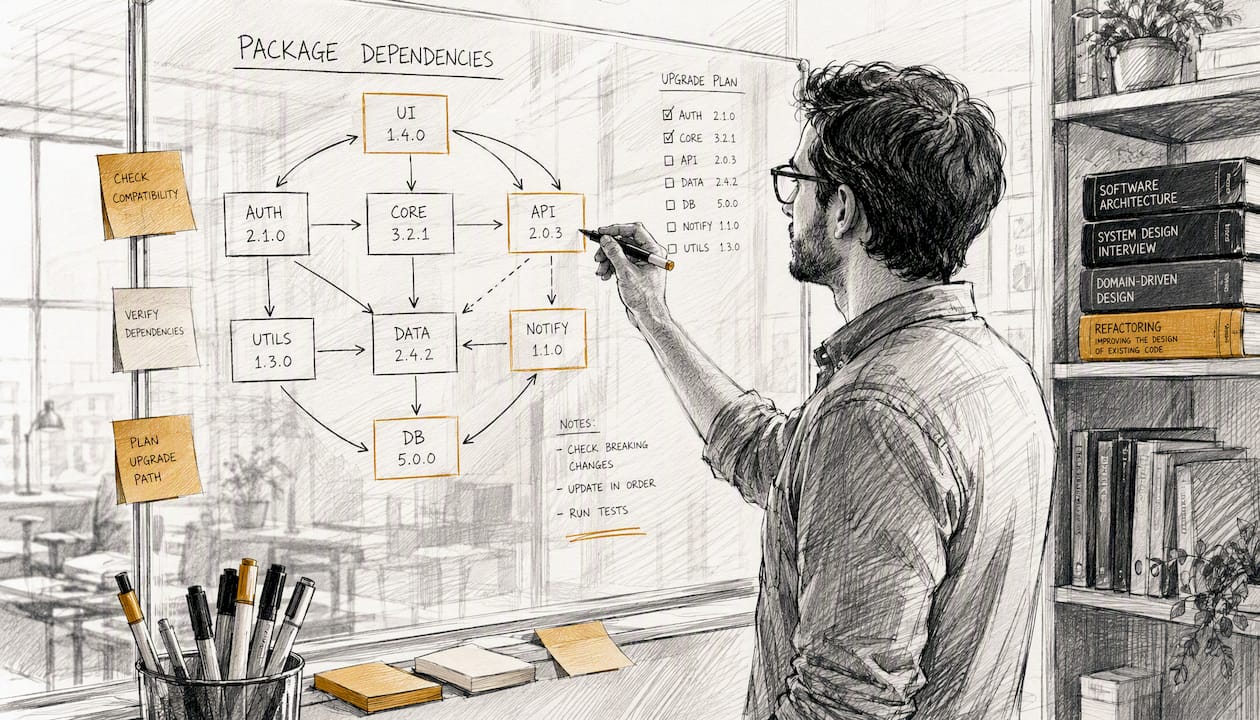
What gets underestimated most is how much helper extraction and Carbon 2.0 quietly ripple through code nobody’s looked at in years, the reporting script, the CSV export, the admin panel nobody uses but can’t break. Test suites rarely cover that code well, which is exactly why the “just run it and see” approach costs more time than the mapping-first approach it’s trying to avoid.
Prioritize the boring work first: inventory your packages, tag your rollback point, and know your PHP extension list cold. For a small app, that discipline takes an afternoon. For a codebase with real complexity, that same discipline is the difference between a scheduled upgrade and an incident report.
Get Help Upgrading Laravel 6 the Structured Way
A manual upgrade works fine when your app is small and your test coverage is solid. When it isn’t, guessing your way through helper extraction and dependency conflicts costs more engineering time than most teams budget for. Golden Path Digital built Laravel Ascend to remove that guesswork: it maps your dependency tree first, then applies code transforms for helpers, Carbon, and Redis changes with test-assisted verification built in, so you’re not discovering breakage after deploy.

For teams weighing several tools before committing, the comparison of Laravel Ascend against Laravel Shift lays out the practical differences in scope and support. If your upgrade involves legacy systems beyond Laravel itself, Golden Path Digital’s legacy code modernization framework covers the broader planning question of when and how to modernize. Request a sample dependency report to see exactly what a mapped upgrade looks like for your codebase before you commit to a timeline.
Sources
Bookmark these before you start, not after something breaks:
- Upgrade Guide – Laravel 6.x – The clean stack for Artisans and agents
- Laravel in 2026: Why It’s Still One of the Best Choices for Modern Web Development
- PHPStan
FAQ
Is Laravel Still Relevant in 2026?
Yes. Laravel remains one of the most widely adopted PHP frameworks, and practitioner reporting on modern Laravel adoption confirms active development and continued enterprise use well beyond version 6.
How Do I Upgrade From Laravel 10 to 11?
The process follows the same core pattern as upgrading to version 6: confirm the required PHP version, update your composer constraints, and check third-party package compatibility before running composer update. Golden Path Digital’s Laravel upgrade guide covers the version-specific breaking changes for major jumps.
How Do I Update Laravel in General?
Check your current version with composer show laravel/framework, review that version’s official upgrade guide for breaking changes, update your PHP runtime if required, then run composer update in a non-production environment before testing thoroughly and deploying.
When Was Laravel 6 Released?
Laravel 6 launched as a long-term support release on September 3, 2019, and it was the first Laravel version to adopt semantic versioning for its release numbering.
Can Automation Handle a Laravel 6 to 9 or 11 Upgrade?
Multi-version jumps compound the same breaking changes across several releases, which is where automation like Golden Path Digital’s Laravel Ascend adds the most value by mapping dependencies once rather than repeating manual audits for each intermediate version.